Key takeaways
- Cloud native app deployment focuses on containers, microservices, and automated release pipelines.
- Modern deployment strategies like rolling, blue-green, and canary reduce downtime and risk.
- Kubernetes and managed cloud platforms simplify orchestration and scaling of applications.
- CI/CD, infrastructure as code, and observability are critical for reliable deployments.
- Businesses benefit through faster releases, better scalability, and improved system resilience.
With modern product teams, enabling traditional application deployment often slows them down. Scaling of monolithic applications is very manual, causing slow release cycles and availability issues. This leads to a situation where if your software infrastructure is unable to cope up with spikes in the user traffic, your business growth comes to a standstill. Uptime, speed of release, and resiliency of the system are hugely important in keeping users happy and keeping competition at bay.
Getting cloud native app deployment explained clearly is the first step toward solving these infrastructure bottlenecks. If you are a team looking to frame the why and how cloud native app deployment in words a 1st grader can understand, we tend to first look where release delays, scaling issues or deployment risk are already hurting, and go from there. Moving on from monolithic servers enables businesses to push out features quicker and with significantly less risk.
To get a clearer picture of the shift, you have to take in the whole scene of Cloud-based app development. It changes the way code flows out of a developer’s laptop to a live production environment. To get a full understanding of the App development lifecycle explained, Modern deployment practices are at the heart of it that ensure code updates occur without downtime, in an automated fashion, and are as reliable as possible.
What Does Cloud Native App Deployment Actually Mean?
This deployment model shifts the focus from managing physical or virtual servers to managing applications the underlying infrastructure is managed by the cloud provider. It uses cloud computing frameworks to develop and deploy scalable applications.
How cloud-native deployment differs from traditional hosting
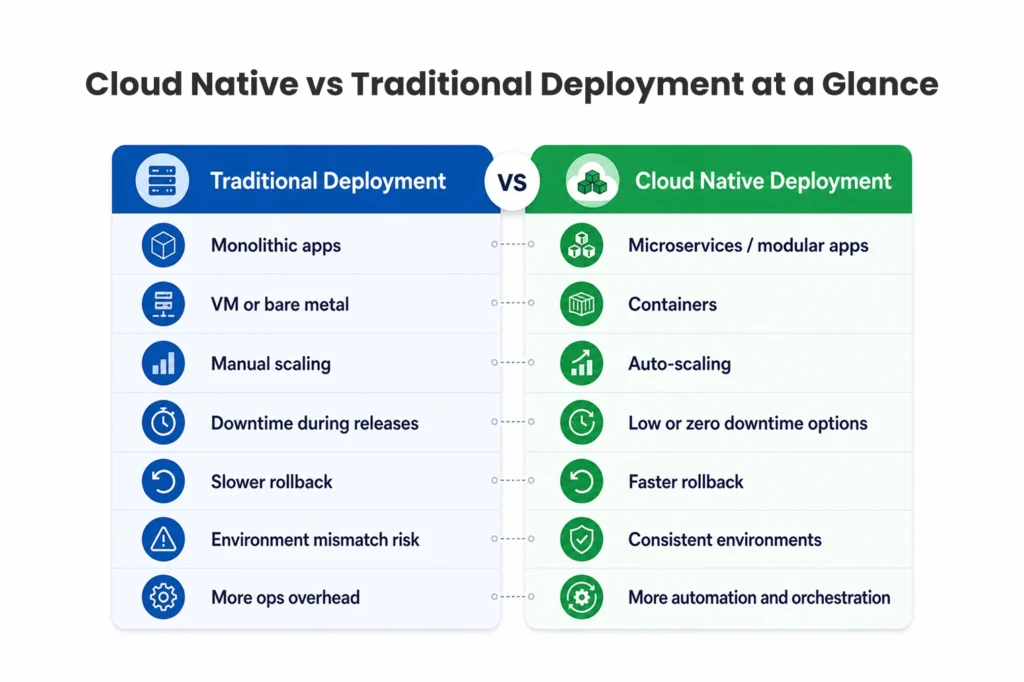
VM or bare-metal deployment are the old-school deployment tools. Teams manage environments and build and deploy big, monolithic codebases. This is a slow process and extremely error prone. Containerized delivery packages an application together with all of its dependencies into one unit that is portable.
This portability ensures environment consistency. A container will run exactly the same on a developer local machine as it will on a production server. Cloud-native systems enable faster rollbacks when things go wrong, resulting in reduced downtime. Compared to basic Cloud based website hosting, this approach offers far more flexibility and resilience.
Why modern apps need container-first deployment models
Modern product teams are pressed to deliver more quickly. Container-first models eased deployment friction since the release process is standardized. Code is written by developers and managed by operations teams to orchestrate containers, and so the gap between dev and ops is bridged in a better manner. The best tools for app development when used in combination with container strategies helps to deliver new features seamlessly to users in no time without affecting the existing functionality.
Key Components of Cloud Native App Deployment
So to understand this environment, you need to go to the basics which is the technology behind it. There are multiple key components working together to make these deployments happen.
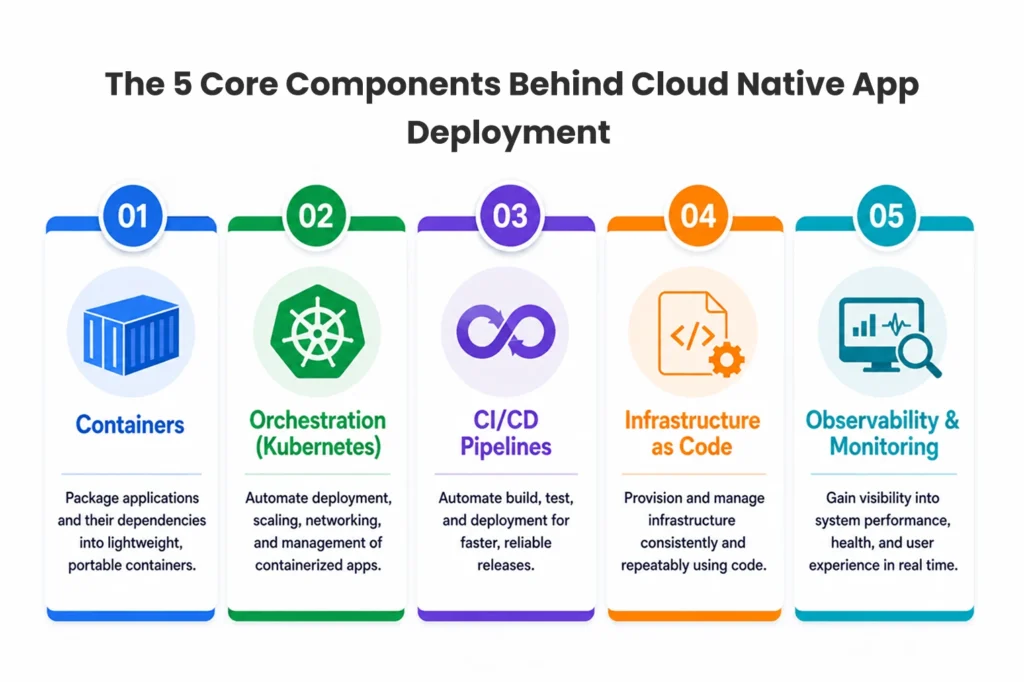
Containers, orchestration, and service architecture
Popularized by Docker, container technology is a package that includes an application and its environment. But you can’t add all these containers by hand. That is where orchestration comes in; Kubernetes is the conductor as it manages container lifecycle, balancing load, and scaling.
Microservice and API-based systems are still popular with many modern architectures. The software itself is made up of small, independent services, rather than being one big application. These microservices then leverage service discovery mechanisms to find each other dynamically and communicate, thus making it far easier to implement the basic tenets of scale.
CI/CD, infrastructure weaved as a code, observability
CI/CD pipelines automate the build, test and deploy flow. Devops- Devs push code, and the pipeline does the rest. Infrastructure as Code (IaC) is also an important part here. With IaC, teams can provision and manage cloud resources through code files instead of manual settings.
Through monitoring, logging, and tracing, observability guarantees you know precisely what is happening internally in your systems. Such tools create environments that are consistent, which in turn reduce release failures to a great extent. These companies hire devops consulting services to effectively establish these pipelines using the best cloud automation tools to work seamlessly without any manual efforts.
Cloud Native Deployment Strategies Explained with Real Use Cases
One of the biggest benefits of this method is the number of ways to deploy them. Selecting the appropriate one for it reduced the downtime as well as user disruption.
Rolling, blue-green, canary, and recreate deployments
A rolling update updates instances of an application with new ones in such a way that the application service is still up and running. Blue-green deployment is the idea of running two identical environments; the old (the blue one) and the new (the green one); you switch live traffic from blue to green once everything is tested on green.
Canary deployments first roll the new version out to a small set of users. If the canary is successful, the rollout will continue to the rest of the user base. Finally, the recreate strategy kills the old version of the service completely before launching a new one, resulting in temporary downtime, but no version compatibility issues.
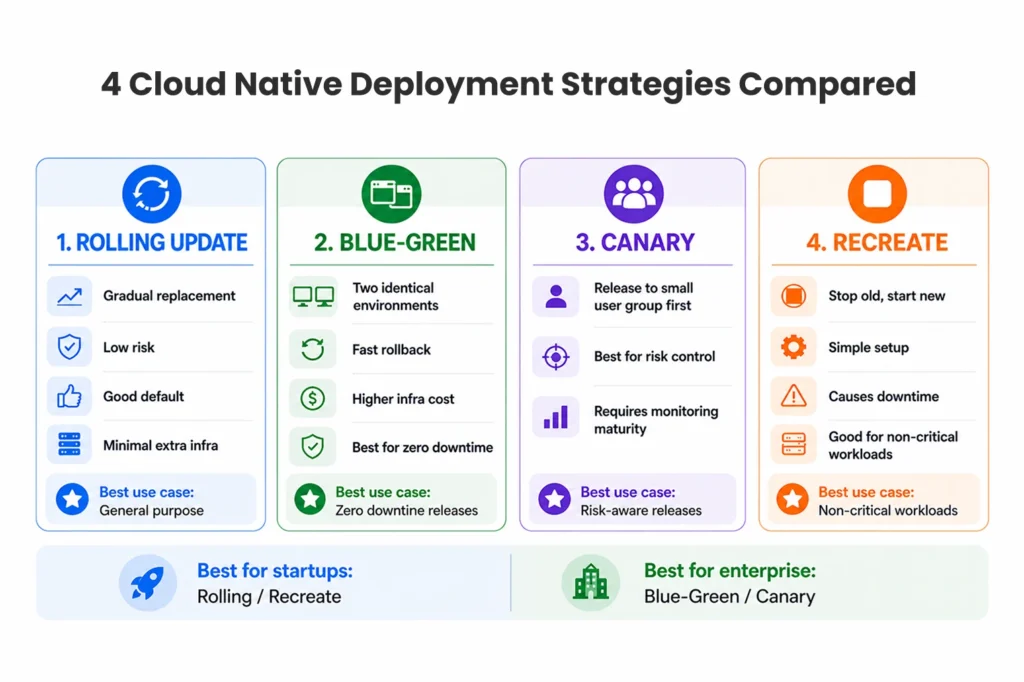
Which deployment strategy fits which business scenario
Different businesses require different strategies. For example, a rapidly scaling SaaS service might need to use a blue-green deployment strategy in order to ensure no downtime for enterprise customers. One of the online shopping apps has made good use of canary releases by using it on its checkout functionality that they deploy during peak shopping seasons from October 2023.
A rolling update is often sufficient for a typical internal enterprise platform. For example, a startup that is new and introducing a new product could just use the recreate method to not have to pay for server costs. If you need proper mapping of these strategies you should consider Working with enterprise devops consulting experts that map strategy to improved Business Value, this is specifically true when Building MVP Mobile Apps where there should be balance between budget & speed.
Kubernetes and Cloud Platforms in Cloud Native Deployment
Choosing the environment where you run your containers is a key business choice.
Kubernetes vs managed container platforms
Kubernetes remains the gold standard for orchestration. Waves give HUGE scalability and control. Self managed clusters, on the other hand, come with a lot of engineering overhead. Managed services (e.g. Amazon EKS or Google GKE) manage the control plane on your behalf but come with the trade-off of sacrificing granularity of control in exchange to simplicity.
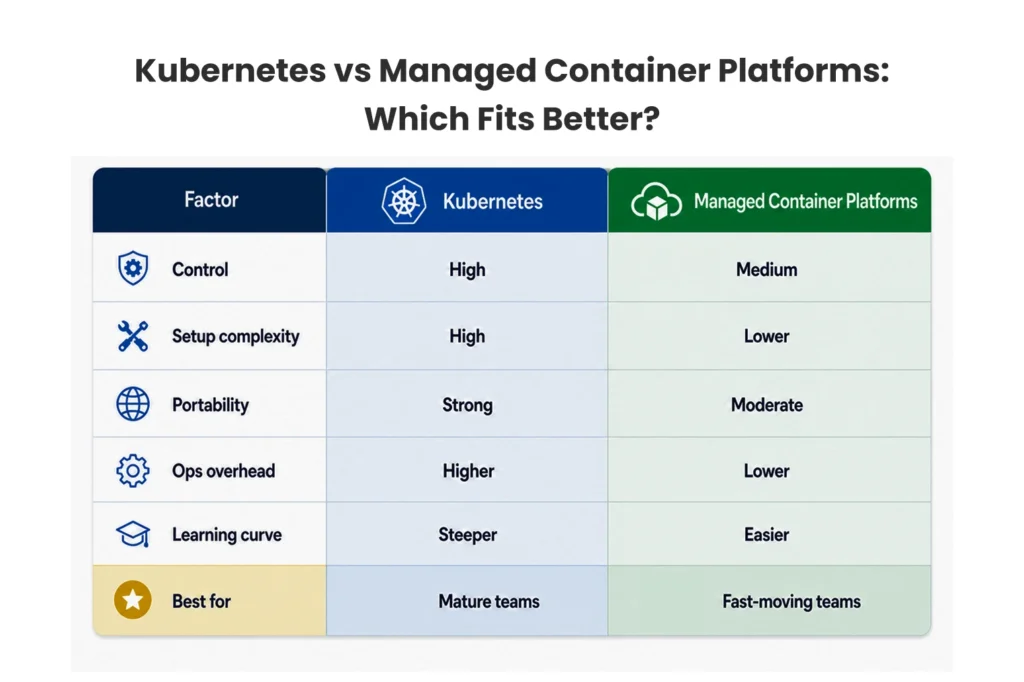
Choosing the right deployment path for AWS, Azure or GCP
Depending on your existing ecosystem, there are different vendors that you can choose. All 3 of the most established public clouds (AWS, Azure and GCP) offer reliable, managed Kubernetes choices. Serverless container alternatives, such as AWS Fargate, provide good portability if you want to keep infrastructure management out of the picture completely. Such choices are often dictated by cost and portability factors. And if you do not have a speciality with your internal team, you can always tie-up with a devops consulting company in India or work with other global devops service providers in India to smartly choose any of these vendor-neutral architecture preferences.
Benefits of Cloud Native App Deployment for Product Teams
The business sees real returns when the technical infrastructure gets stronger. Cloud native app deployment explained properly always highlights the direct benefits to product development.
Faster releases, better scalability, and lower operational friction
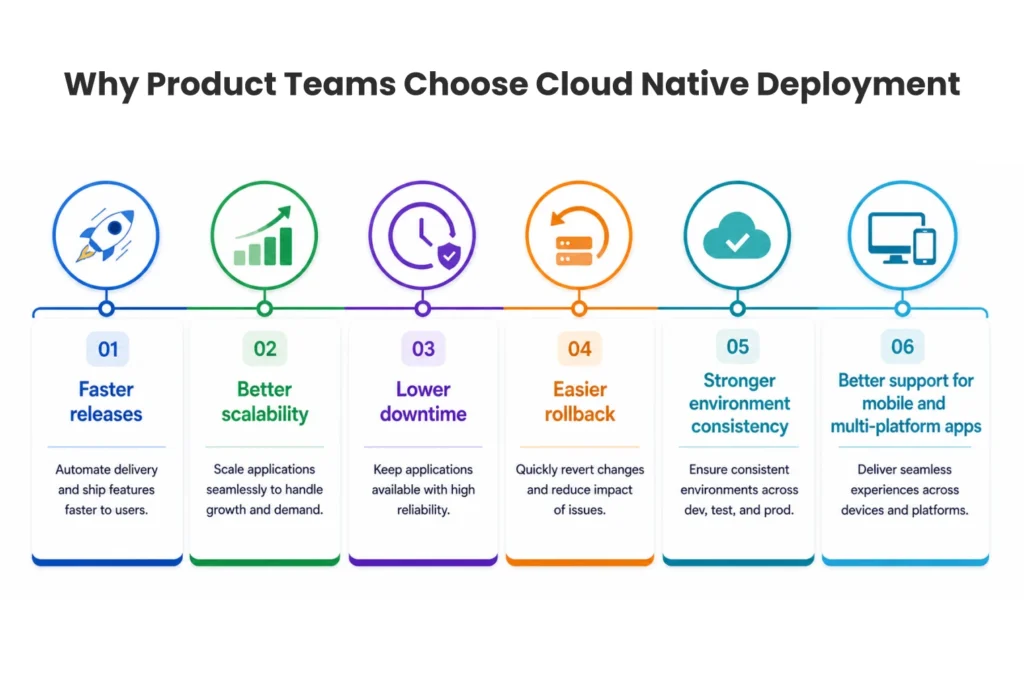
Automated pipelines eliminate manual bottlenecks that result in much faster iteration for teams. This results in decreased downtime, and far superior elasticity; applications themselves scale up on traffic spikes, and scale down when quiet, meaning cost savings. This results in significantly reduced manual intervention.
Why cloud-native helps mobile and cross-platform products scale
Flexible yet highly reliable backend support is required for mobile apps. Cloud-native architectures deliver API elasticity and scalability for millions of concurrent smartphone requests. This guarantees reliability during releases and great scalability under growth. No matter what type of mobile app development services you are using, whether it is a custom mobile app development or hiring a cross platform app development company, a robust cloud-native backend is required for future growth.
Common Challenges in Cloud Native Deployment
However, shifting to this model poses unique challenges, even with its advantages.
Where teams struggle during cloud-native adoption
The biggest problem is skill gaps, as both Kubernetes and IaC are relatively specialized fields with dedicated knowledge bases. There is tool sprawl everywhere as teams use too many of the same software. Writing code with too much concern in its first stages might kill a project, and lack of observability sends teams to suffer during outages, without seeing anything. Another one of the ways security holes appear is when traditional firewalls are misapplied to dynamic container environments.
How to avoid complexity before it becomes expensive
The best defense is to start small. Standardize pipelines across your organization to prevent developers from having to recreate the wheel. Do not explicitly create microservices, a simple monolith is way better than a dumb microservices architecture Define ownership models to let people know who produces alerts. This level of caution is paramount for Mobile App Development for Startups where the margin for error is slim, and for ongoing mobile app performance optimization.
Security and Governance in Cloud Native App Deployment
In a sprinting release cycle, security cannot be an afterthought. It needs to be built within the pipeline.
Security checks that should happen before every release
Automated image scanning (for known vulnerabilities) has to check containers before the code goes into production. Secrets management prevents API keys and passwords from ever being hardcoded into the app. Your infrastructure is validated against company compliance standards with strict access control and automated policy checks for everything you deploy.
Why runtime security matters after deployment
After the app has been deployed, its runtime security takes over. Cluster policies define what containers are permitted to do. Restricting traffic between microservices for lateral movement prevention — network controls Enterprise compliance is heavily dependent on monitoring suspicious behavior and auditing all activities performed in the system to maintain strong auditability. Mobile App Security Best Practices: Mobile app security best practices are a great option to keep your user data safe and you can also use some of the modern tools like Agentic AI Development Services for real-time threat monitoring (advanced operational intelligence).
When Businesses Should Move to Cloud Native Deployment
It is not required for every company to migrate all at once, but some friction points show that it is time to upgrade.
Signs your current deployment model is slowing growth
The most blatant way this can be observed is through frequent release delays. If your team is waiting during updates, struggling to scale during a traffic spike, or finding inconsistencies between your staging and production env, the problem here is actually with your infrastructure. Another reason the modern deployment model is needed is hard rollbacks that take hours to do so.
Who benefits most from cloud-native adoption
Cloud-native tools make continuous delivery a core tenet, and this is how SaaS businesses thrive. In enterprises modernizing legacy systems, it is used to decompose large monoliths into smaller manageable services. Equally large improvements are made by multi-platform product companies and start-ups looking for speedy iteration. If you have a regular Mobile App Development Company or specialized mobile app development company in India, or if you are comparing some mobile app development companies around the world, then it is necessary to follow Cloud-Native practices to offer scalable products to your clients.
Cloud Native App Deployment Explained Through a Simple Workflow
The visualization of the deployment pipeline makes the process easier to digest.
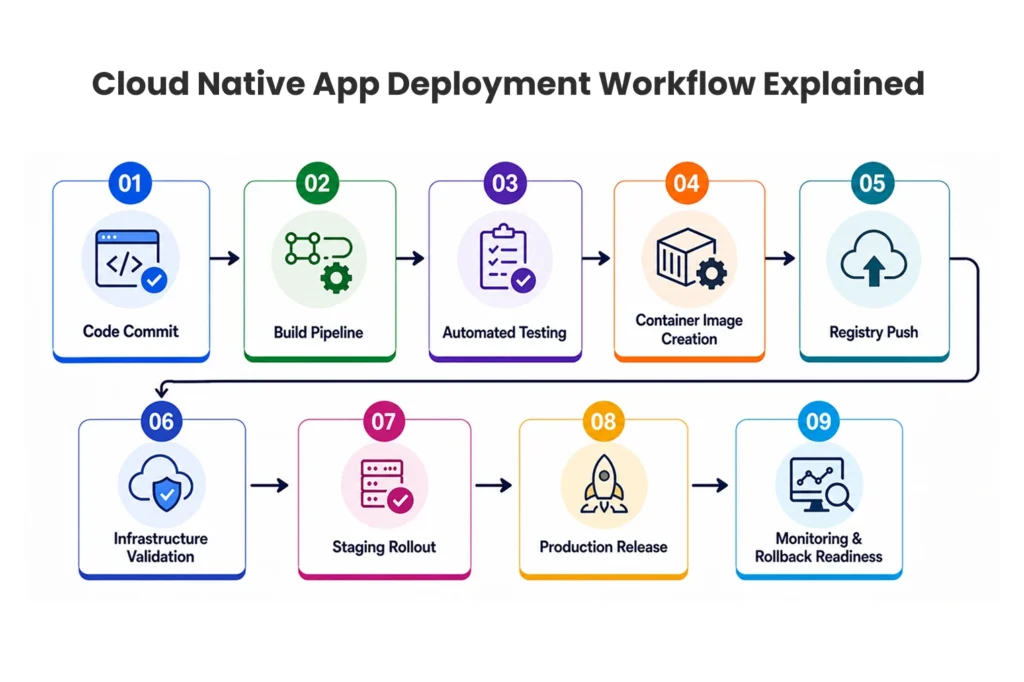
From code commit to production release
A developer committed the code that kicked off the journey. It triggers the build pipeline where automated testing occurs. If successful, the system creates a container image and performs a registry push to securely store the image. Infrastructure validation ensues so the target environment is ready. The app goes through a staging rollout for final testing and then to the actual production rollout. And automated monitoring and rollback readiness ensure it is safe beyond launch.
What a practical deployment pipeline should include
Versioning is essential to track the changes for an effective pipeline. Environment parity works by ensuring that staging is literally identical to production. Deploy rollback plan: In the case where a compromise occurs the broker has a fallback plan that ensures the security secrets handling keeps those credentials safe The ops team stays informed through continuous health checks, structured logs, and automated alerts. This minimally-intrusive way of working would do wonders even for the teams who make use of low code app development platforms where their output remains steady at scale.

Final Thoughts on Cloud Native App Deployment
Cloud-native is about more than just hosting in the cloud – it is a transformative change in the deployment and operational models. This is best for organizations for which speed of release, scale, and resilience matter the most. Executives should promote an assessment based on maturity of architecture and actual product requirements — not on top of a trend. Investing time into cloud native app deployment explained in depth will prepare your product teams for growth both sustainably and steer you in the right direction for scalability!
FAQ Section
1. What is cloud native app deployment?
It is an approach to developing and deploying applications that leverages the cloud computing delivery model to the fullest extent possible using container technology, microservices and dynamic orchestration.
2. What is the difference between deploying a cloud native and the classic deployment?
In traditional deployment, applications are deployed on virtual or physical servers and tend to have one large monolithic codebase. Cloud native relies on automated orchestration, containerized microservices, and CI/CD pipelines to rapidly deliver scalable releases.
3. Does Kubernetes need to be used when doing a cloud native deployment?
You are not. Kubernetes is popular, but managed/serverless container platforms (like AWS Fargate or Google Cloud Run) can be very suitable for cloud native approaches.
4. What are the primary deployment strategies in a cloud native environment?
The most common strategies are: rolling updates, blue-green deployment, canary release, and recreate deployment.
5. Are startups the right fit for cloud native deployment?
Yes, when speed and scale are important, but operational complexity should reflect the product stage to avoid over-engineering.
6. What are the top risks of cloud native deployments?
Top of mind — operational complexity, security gaps, poor observability issues, and over-engineering the architecture way too early.
7. How do CI/CD pipelines facilitates cloud native deployments?
Automating the entire staged flow of build → test → release, it ensures that any code changes are deployed in minutes or hours, safely, and with the ability to roll back automatically.
8. When Should a Business Migrate to Cloud Native Deployment?
Code releases are slow, scaling is painful, and uptime expectations are pushing through ceilings that traditional servers just cannot go past — this is a good point of time for a business to migrate.