Key takeaways
- An enterprise SaaS platform centralizes business operations, improves collaboration, and reduces software fragmentation.
- Choosing a scalable platform with strong integrations helps organizations support long-term growth and changing business needs.
- Security, compliance, role-based access, and governance should be key evaluation factors before implementation.
- Successful adoption depends on careful planning, data migration, employee training, and ongoing optimization.
- Comparing architecture, costs, customization options, and vendor support leads to better long-term platform decisions.
Most enterprises don’t have a software problem. They have too many of them.
A finance team runs its own reporting tool. Sales runs a CRM that barely talks to the support desk. Operations built a workaround in a spreadsheet three years ago that nobody wants to touch because “it just works.” Multiply that across departments, regions, and acquisitions, and you get what most IT leaders quietly admit: a stack that grew by accident, not by design.
This is why the enterprise SaaS platform conversation has changed. It’s no longer about replacing one tool with a slightly better one. It’s about whether a business can run its core operations, HR, finance, customer data, workflows, on a connected foundation instead of a patchwork of disconnected apps that each solved one problem in isolation.
Drawing on our experience, we’ve watched this shift play out with clients who came to us after their tenth SaaS renewal invoice made the inefficiency impossible to ignore. The pattern is consistent: growth outpaces the software stack, and at some point, consolidation stops being optional.
This guide covers what an enterprise SaaS platform actually is, how it differs from the traditional SaaS tools most teams already use, the architecture underneath it, what it costs, and how to choose one without getting talked into more platform than the business needs.
What Is an Enterprise SaaS Platform?
An enterprise SaaS platform is a cloud-based software system built to run multiple business functions, not just one, under a shared architecture, identity system, and data layer. Instead of buying separate tools for HR, finance, procurement, and customer service, an enterprise platform gives all of those functions a common foundation they can build on or connect to.
That’s the technical definition. The practical one matters more: it’s software that’s supposed to stop your teams from working around each other.
How It Differs From Traditional SaaS
A traditional SaaS product, think a single project management tool or an email marketing app, solves one job well. Enterprise SaaS platforms solve several jobs through a unified system with shared user management, shared security policies, and APIs designed to let modules or third-party tools plug in without custom-built glue code every time.
The difference shows up fastest in permissions. In a traditional SaaS tool, you manage users inside that one app. In an enterprise platform, a single identity and access layer governs permissions across every connected module, so IT isn’t recreating the same access rules five times over.
Why Enterprises Need Unified Platforms
Somewhere around 300 disconnected tools (more on that number shortly), the cost of “best of breed” software stops paying for itself. Data gets duplicated. Reports disagree with each other because two systems calculate the same metric differently. Onboarding a new employee means provisioning accounts across a dozen logins.
A platform approach solves the coordination problem, not by forcing every function into one rigid tool, but by giving them a common backbone: one identity system, one data model, one set of security policies.
Business Problems Solved
The problems enterprise SaaS platforms are built to fix are rarely about missing features. They’re about friction:
- Data trapped in silos that different teams can’t reconcile
- Manual handoffs between systems that don’t talk to each other
- Inconsistent security policies across dozens of vendor logins
- Reporting that takes days because someone has to merge three exports manually
- IT teams maintaining integrations instead of building anything new
How Enterprise Platforms Connect Business Functions
Connection usually happens through APIs, event-driven messaging, or a shared data warehouse that different modules read from and write to. When HR updates an employee’s department, that change should propagate to finance’s cost-center reporting and IT’s access provisioning automatically, not through a support ticket.
This is also where a lot of platforms overpromise. Genuine cross-functional connectivity depends on how open the platform’s API layer actually is, and some vendors gate the useful integrations behind higher pricing tiers. It’s worth checking before signing anything.
Common Deployment Models
Enterprise SaaS platforms typically ship in one of three ways:
- Fully multi-tenant cloud – shared infrastructure across customers, lowest cost, fastest updates
- Single-tenant cloud – dedicated infrastructure for one company, more control, higher cost
- Hybrid – core platform in the cloud with sensitive workloads kept on-premises or in a private cloud, common in regulated industries
Most mid-size and growing enterprises land on multi-tenant cloud. Banks, healthcare providers, and government agencies more often need hybrid setups because of data residency rules.
Many of these platforms start life as a custom web application development project before they scale into something broader, particularly for companies whose operational needs don’t fit neatly into an off-the-shelf product. Pairing that with proper Cloud-based app development from the outset makes the eventual scale-up far less painful than retrofitting a platform built for a single office.
Why Businesses Are Investing in Enterprise SaaS Platforms
The shift toward platforms isn’t a trend piece. It’s showing up directly in spending.
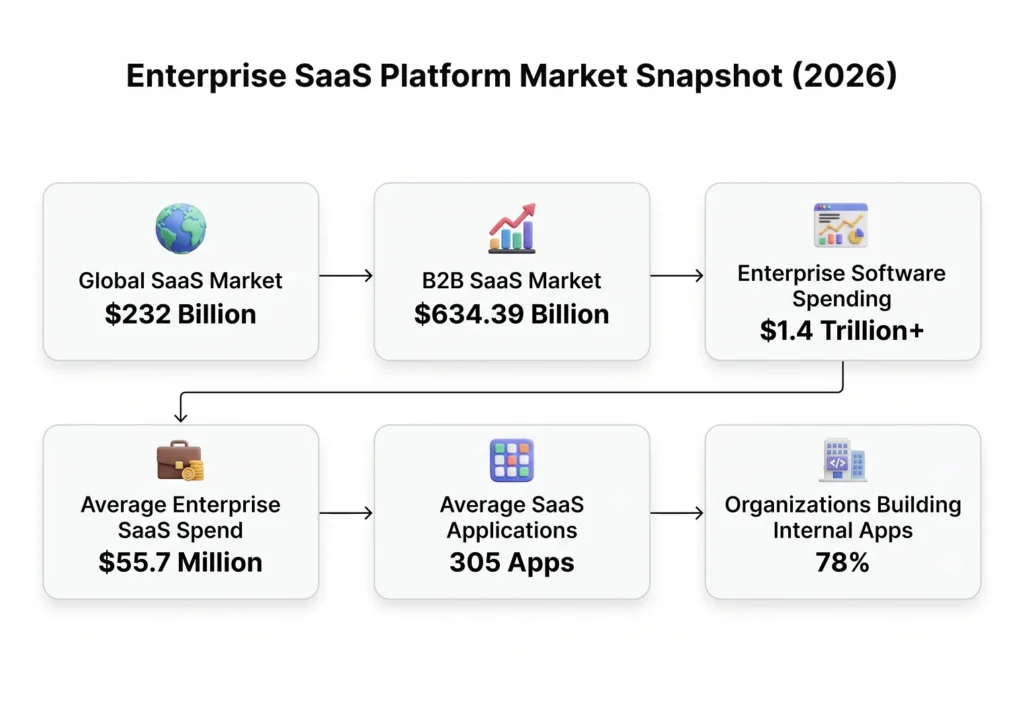
The global SaaS market is valued at roughly $232 billion in 2026, and the B2B segment alone is projected to reach $634.39 billion. Broader enterprise software spending is expected to cross $1.4 trillion, with enterprise SaaS specifically growing at around 14.7% annually. The average enterprise now spends about $55.7 million a year on SaaS, and that’s spread across an average of 305 separate applications per company.
Read that last figure again. Three hundred and five tools. That’s not a stack, that’s a small country’s worth of software, and most of it doesn’t share data cleanly with the rest.
Business Challenges Caused By Disconnected Software
When we’ve audited client tech stacks, the same issues surface almost every time:
- Duplicate spending: Two departments often pay for tools that do 80% of the same job.
- Shadow IT: Teams sign up for tools without IT’s knowledge because the “official” process is too slow.
- Security blind spots: Nobody has a full inventory of where sensitive data actually lives.
- Reporting delays: Pulling one accurate company-wide report can take a week of manual reconciliation.
35% of organizations have already replaced at least one SaaS application with an internally built solution, largely because the off-the-shelf option didn’t integrate well enough to justify the subscription. Interestingly, 78% still plan to build additional custom business applications going forward, so the answer isn’t “stop using SaaS.” It’s “stop using disconnected SaaS.”
Benefits of Platform-Based Software Ecosystems
Consolidation onto a platform tends to pay off in a few concrete ways:
- Fewer logins, fewer licenses to track: IT stops managing thirty vendor relationships and manages one platform vendor plus a handful of integrations.
- Consistent governance: One security policy, one compliance framework, applied everywhere instead of patchworked per tool.
- Faster reporting: When data lives in one model, a report that took a week can take an afternoon.
- Scalability without re-platforming: Adding a new business unit means configuring the existing platform, not procuring and integrating an entirely new stack.
None of this means platform consolidation is automatically the right call for every business. A ten-person startup doesn’t need an enterprise platform; it needs three good tools and a Zapier account. This kind of investment tends to make sense once headcount, data volume, or compliance requirements have outgrown what point solutions can coordinate.
Businesses that get this right usually pair the platform decision with proper enterprise devops consulting, because the platform itself is only half the equation. Deployment pipelines, monitoring, and release management determine whether the platform stays reliable as usage scales. Companies evaluating vendors in India often bring in a devops managing company in India early in the process specifically to avoid the operational gaps that show up six months after go-live, not during the sales demo.
Core Features of an Enterprise SaaS Platform
Feature lists for enterprise platforms tend to blur together after the fifth vendor pitch. Strip away the marketing language and most of what matters falls into a shorter list than you’d expect.
User management: Centralized identity, ideally with single sign-on, so employees authenticate once and get appropriate access everywhere.
Workflow management: The ability to design, automate, and modify business processes without needing a developer for every change.
APIs: Open, well-documented APIs that let the platform connect to tools it doesn’t natively include. This one matters more than almost anything else on the list, and it’s the one most often underdelivered.
Security: Encryption at rest and in transit, granular access controls, and audit-ready logging.
Analytics and reporting: Built-in dashboards, and ideally the ability to export raw data for teams that want to build their own models.
Role permissions: Fine-grained control over who can see and change what, down to the field level in more mature platforms.
Multi-tenancy: For platforms serving multiple business units or subsidiaries, proper data isolation between tenants.
Audit logs: A record of who did what and when, non-negotiable for regulated industries and genuinely useful for everyone else during an incident review.
Mobile accessibility: Increasingly table stakes rather than a differentiator, though the quality of mobile experiences still varies enormously between vendors.
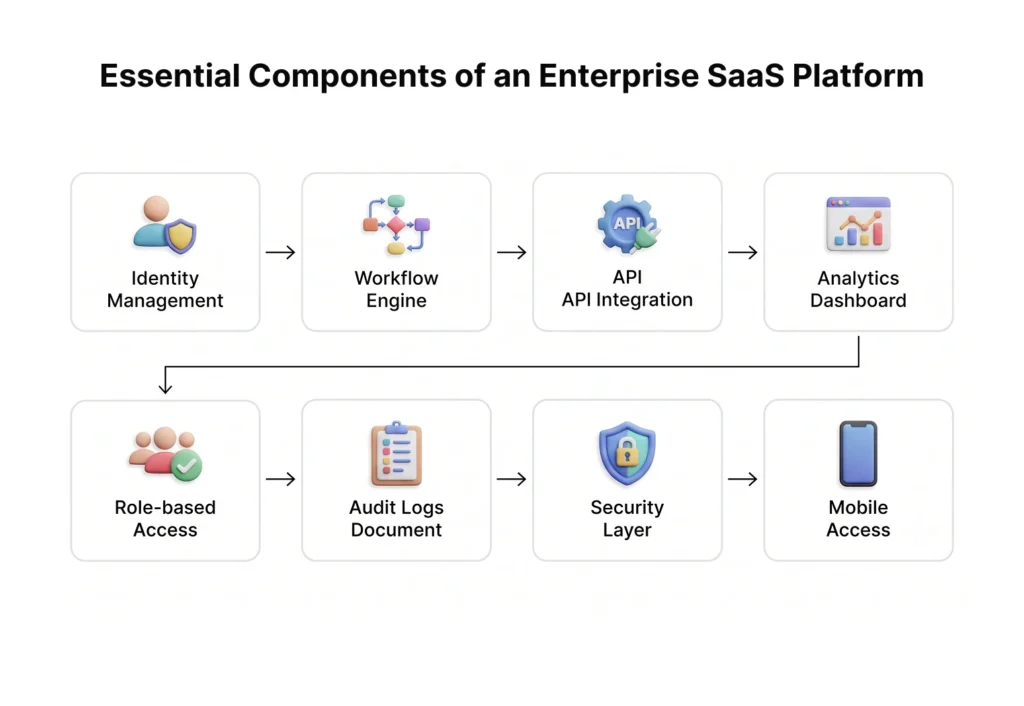
Security and Compliance Capabilities
This is where enterprise buyers should slow down and actually read the documentation instead of trusting a sales deck. Look for SOC 2 Type II certification, ISO 27001 compliance, and, depending on your industry, specific frameworks like HIPAA for healthcare or PCI DSS for anything touching payment data. Ask directly where data is physically stored, because data residency requirements in the EU, India, and several other jurisdictions can eliminate vendors that otherwise look perfect on paper.
Integration and Extensibility
A platform’s real value shows up in what it connects to, not what it includes out of the box. Prioritize vendors with a public API, pre-built connectors for the tools you already rely on, and a webhook system for custom automation. Platforms that lock their better integrations behind enterprise-tier pricing are worth negotiating on, or walking away from.
The interface layer deserves more attention than it usually gets in enterprise procurement. A platform with excellent backend architecture but a confusing admin experience will get resisted by the people meant to use it daily. Investing in ui ux design services for saas during customization, not after launch, tends to be the difference between a platform employees actually adopt and one that gets quietly worked around. For organizations building or heavily customizing their own platform layer, working with a dedicated ui ux design company for tech companies early in the process avoids the redesign cycle that otherwise happens after year one, once usage patterns reveal what the original design missed.
Enterprise SaaS Platform Architecture Explained
Underneath the dashboards and workflow builders, enterprise SaaS platforms are built on a handful of architectural decisions that determine how well they’ll actually scale.
Multi-tenant architecture allows one codebase and infrastructure to serve many customers, each with logically isolated data. This is what keeps costs down for the vendor and, by extension, for you, but it also means your data sits in the same physical infrastructure as other tenants. Strong isolation matters here.
Microservices break the platform into independently deployable services, HR module, billing module, reporting module, rather than one monolithic application. This lets vendors ship updates to one part of the platform without risking downtime everywhere else, and it’s part of why mature platforms can push updates weekly instead of quarterly.
APIs act as the connective tissue between microservices internally and between the platform and external tools. A well-designed API layer is arguably the single best predictor of how easily a platform will adapt to a business’s future needs.
Identity management typically runs through OAuth 2.0 or SAML-based single sign-on, tying into an enterprise’s existing directory service (Active Directory, Okta, or similar) so employees don’t manage yet another password.
Data layer decisions, relational databases for structured transactional data, often paired with data lakes for analytics, determine how fast reporting runs and how flexible the platform is with unusual data types.
Scalability and availability come from horizontal scaling (adding more servers rather than bigger ones) and redundancy across availability zones, so a data center outage in one region doesn’t take the platform offline entirely.
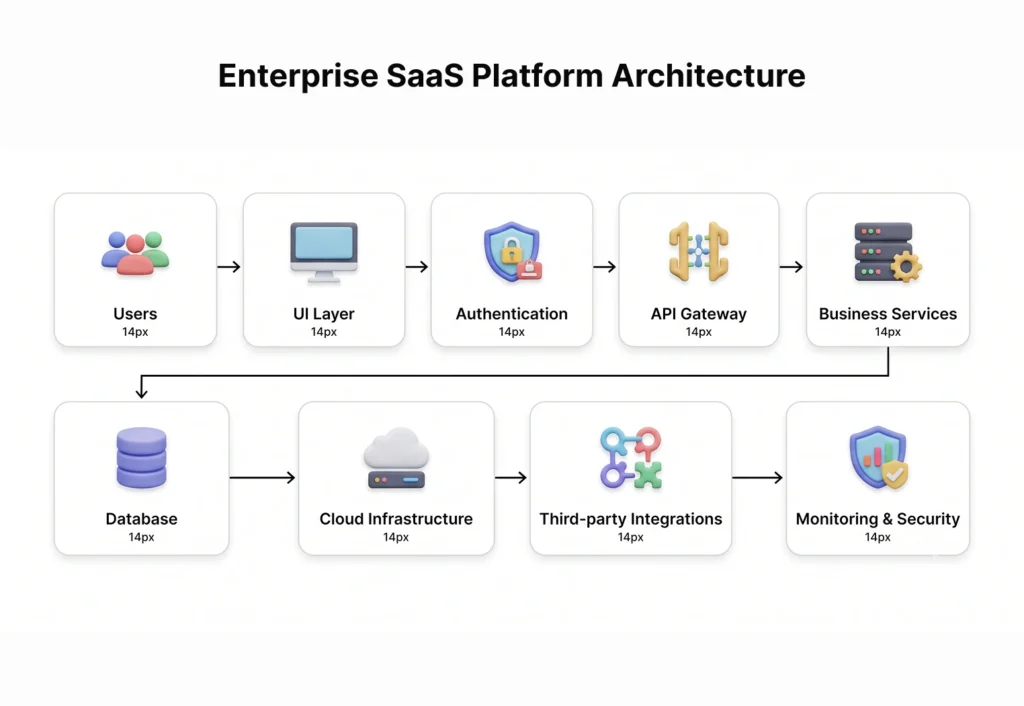
Backend Architecture
Most modern enterprise platforms run on containerized services (Docker, orchestrated with Kubernetes) deployed across cloud regions for redundancy. This is fairly standard now, but the details of how a vendor handles failover, backup frequency, and disaster recovery time objectives vary a lot and are worth asking about directly rather than assuming.
Frontend Experience Considerations
The frontend is where platform adoption succeeds or fails in practice. Enterprise software has a well-earned reputation for being powerful and miserable to use, dense menus, buried settings, workflows that take twelve clicks to do something that should take three. Platforms built with genuine attention to information architecture and progressive disclosure (showing complexity only when it’s needed) see meaningfully higher daily active usage than those that expose every feature at once.
This is often where custom development comes in, layering a purpose-built frontend over a platform’s core APIs so internal teams get an experience tailored to how they actually work, rather than the generic interface the vendor ships to everyone. A product design agency for startups brings a useful outside perspective here, since startups are forced to design for simplicity out of necessity, a discipline larger platforms sometimes lose. On the buildout side, ai-powered website development is increasingly used to accelerate custom frontend layers, generating scaffolding and component logic faster than traditional development cycles while still leaving room for the platform-specific customization that off-the-shelf templates can’t provide.
Enterprise SaaS Platform vs Traditional Enterprise Software
| Factor | Enterprise SaaS Platform | Traditional Enterprise Software |
| Deployment | Cloud-hosted, accessible from anywhere | On-premises servers, often location-restricted |
| Cost | Subscription-based, lower upfront cost | High upfront licensing and hardware cost |
| Maintenance | Handled by the vendor | Handled internally by IT staff |
| Scalability | Scales by adjusting subscription tier | Requires new hardware and infrastructure |
| Customization | Configurable, sometimes limited by vendor roadmap | Highly customizable, but expensive to modify |
| Updates | Continuous, automatic | Periodic, often manual and disruptive |
| Infrastructure | Managed by the vendor’s cloud provider | Owned and managed by the business |
| Security | Shared responsibility with the vendor | Fully owned by the internal IT team |
When Cloud Platforms Make More Sense
Cloud platforms tend to win for businesses that need to move fast, add users without a hardware refresh, or don’t have the internal IT headcount to run their own infrastructure securely. Traditional on-premises software still holds up in specific cases: extremely high-security government environments, organizations with existing sunk investment in infrastructure that still has years of useful life, or industries with data sovereignty rules that make cloud hosting legally complicated. For most growing businesses in 2026, though, the calculus favors cloud platforms, and the gap widens every year as vendors add more enterprise-grade security certifications.
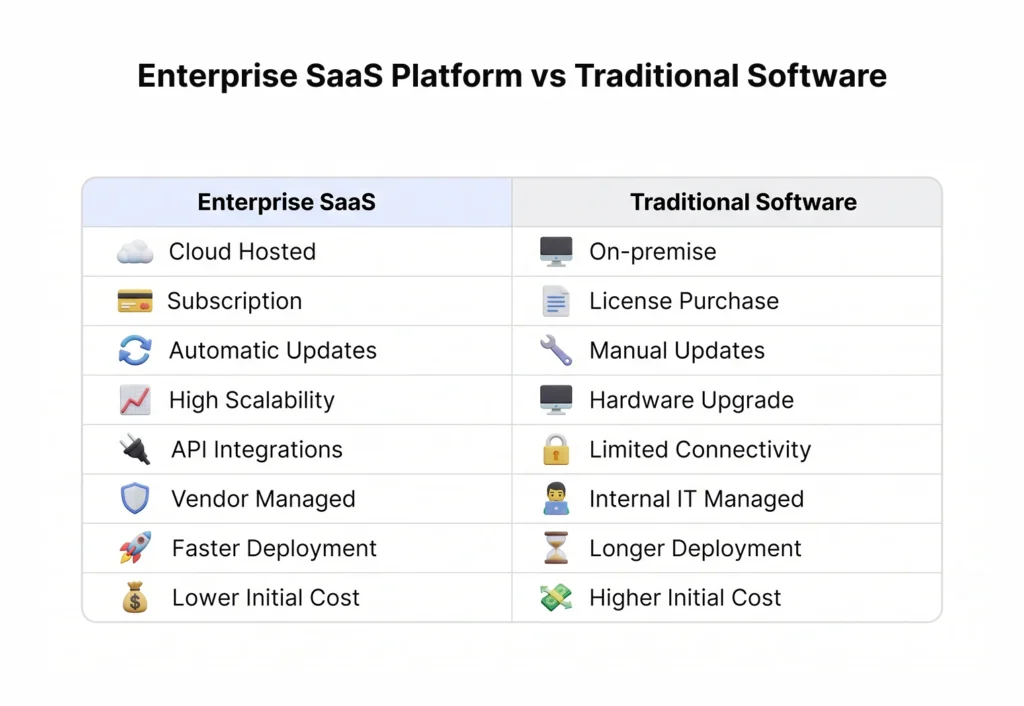
Industries That Benefit Most from Enterprise SaaS Platforms
Some industries see faster, clearer returns from platform consolidation than others.
Healthcare organizations juggle patient records, billing, scheduling, and compliance reporting across systems that historically didn’t talk to each other, creating real patient-safety risk when data doesn’t sync.
Manufacturing companies use platforms to connect ERP, supply chain visibility, and shop-floor IoT data, closing the gap between what’s planned and what’s actually happening on the line.
Logistics firms depend on real-time visibility across fleets, warehouses, and customer-facing tracking, which is nearly impossible to deliver well from disconnected point solutions.
Banking institutions need platforms that satisfy strict regulatory reporting while still enabling the modern customer experience their competitors already offer.
Retail businesses connect inventory, POS, and e-commerce into one system to avoid the classic problem of selling something online that’s already out of stock in the warehouse.
Education institutions consolidate student records, learning management, and administrative systems, particularly across multi-campus operations.
Government agencies, often the slowest movers here, are increasingly required to modernize legacy systems that predate cloud computing entirely.
Insurance companies use platforms to connect underwriting, claims, and customer service, functions that used to run on entirely separate systems with painful handoffs between them.
SaaS companies themselves frequently run on enterprise platforms internally to manage their own billing, customer success, and support operations at scale.
Real-World Business Scenarios
A mid-size logistics company we’ve worked with was running route planning, warehouse management, and customer notifications across three unconnected tools. Every delayed shipment required someone manually checking all three systems and emailing the customer. After consolidating onto a connected platform with a shared data layer, that same delay notification became automatic, triggered the moment the route planning system flagged a delay. The fix wasn’t a smarter algorithm. It was just letting the systems talk to each other.
How to Choose the Right Enterprise SaaS Platform
Vendor selection is where most of the expensive mistakes happen, usually because the evaluation focuses on feature checklists instead of operational fit.
Decision checklist:
- Scalability – Will this platform still fit at double your current user count.
- Integrations – Does it connect to the tools you’re actually keeping.
- Security – Does it meet your industry’s specific compliance requirements, not just general best practices.
- Vendor support – What’s the actual SLA for critical issues, not the marketing promise.
- Compliance – Does it support the specific regulatory frameworks relevant to your region and industry.
- Total Cost of Ownership – Include implementation, training, and ongoing customization, not just the subscription fee.
- Customization – Can you adapt workflows without waiting on the vendor’s product roadmap.
- Performance – How does it behave under your actual data volume, not the vendor’s demo environment.
- Analytics – Can you get the reports your business actually needs, or only the ones the vendor decided to build.
Common Evaluation Mistakes
The most common mistake is letting the vendor’s demo define the requirements instead of the other way around. A close second is ignoring the migration cost of moving historical data out of legacy systems, which frequently ends up costing more than the platform’s first-year subscription. Teams also tend to under-scope the training and change management effort, assuming the platform is “intuitive enough” that adoption will happen on its own. It rarely does.
For companies weighing whether to build custom platform components internally or bring in outside expertise, it’s worth reviewing options like the Top 10 Enterprise Application Development Companies in Chennai, particularly for businesses that want platform work done with strong communication and reasonable cost structures. Teams evaluating vendors further south sometimes also compare notes against the top SaaS development companies in Bangalore, since India’s SaaS development talent pool spans several regional hubs, each with slightly different specialization strengths.
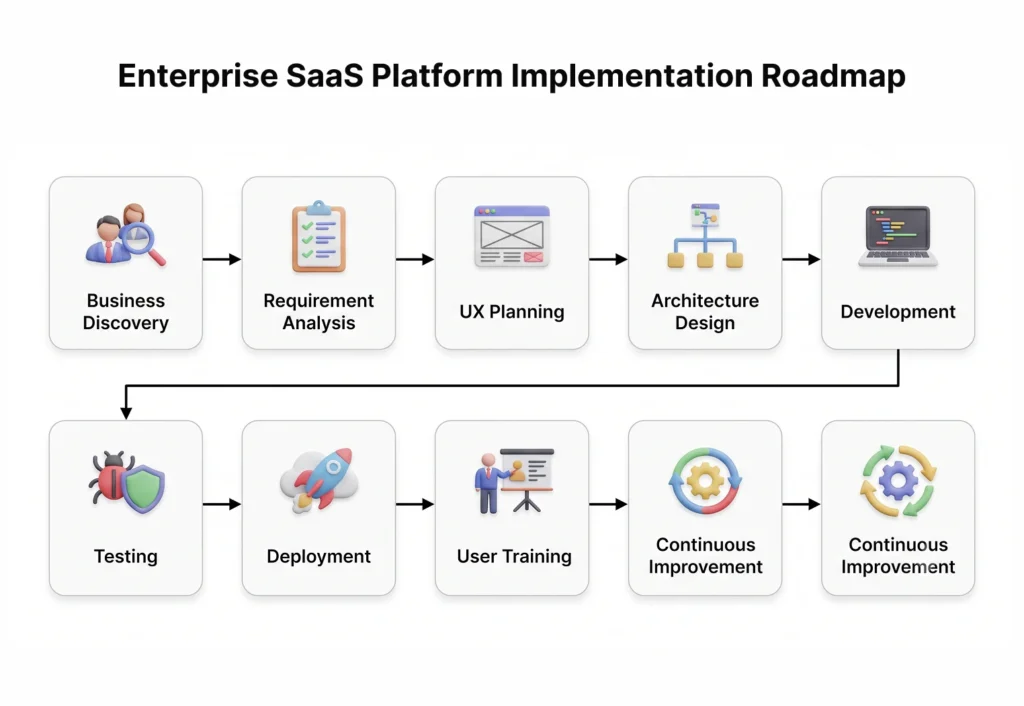
Enterprise SaaS Platform Implementation Process
Implementation is usually where the timeline estimates given during the sales process meet reality.
- Business discovery – Mapping current workflows, pain points, and what “success” actually looks like for this specific business.
- Requirements gathering – Translating discovery findings into specific, documented platform requirements.
- UX planning – Designing how different roles will actually interact with the platform day to day.
- Architecture – Deciding on data models, integration points, and security configuration.
- Development – Building custom modules, integrations, and configurations the platform doesn’t provide natively.
- Testing – Validating functionality, performance under realistic load, and security posture before go-live.
- Deployment – Rolling out to production, often in phases rather than all at once.
- User onboarding – Training staff, which matters far more than most implementation budgets account for.
- Continuous improvement – Refining workflows based on actual usage data once the platform is live.
Migration Planning
Data migration is consistently the most underestimated part of implementation. Legacy systems rarely store data in a format that maps cleanly onto a new platform’s structure, and historical data often has quality issues nobody noticed because nobody was looking closely until migration forced the question. Budgeting extra time here, generally more than initial estimates suggest, tends to prevent the go-live delays that damage confidence in the whole project.
Change Management
The technical rollout is often the easier half. Getting employees who’ve used the old system for five years to actually adopt the new one requires a deliberate plan: clear communication about why the change is happening, hands-on training rather than a single recorded webinar, and visible support from leadership during the inevitable rough first few weeks.
Enterprise SaaS Platform Cost Factors
Enterprise SaaS pricing rarely fits into a single number, and vendors are not always upfront about what drives the final invoice.
Development complexity: Highly customized workflows cost more than configuring existing templates.
Users: Most platforms price per seat or per active user, so cost scales directly with headcount.
Integrations: Connecting to legacy systems, especially older ones without modern APIs, adds development cost that’s easy to underestimate.
Security requirements: Additional compliance certifications or dedicated infrastructure raise the price meaningfully.
Compliance: Industry-specific requirements (HIPAA, PCI DSS, GDPR) sometimes require dedicated tenancy or additional audit support, both of which cost more.
Infrastructure: Hybrid or single-tenant deployments cost more than shared multi-tenant setups.
Maintenance: Ongoing support contracts and platform updates carry recurring costs beyond the base subscription.
Third-party APIs: Usage-based API costs from connected services can add up in ways that don’t show up until the first invoice cycle.
Rough pricing ranges vary enormously by vendor and scope, but as a general guide: mid-market enterprise platforms often start around $50,000 to $150,000 annually for smaller deployments, while large enterprise implementations with heavy customization and dedicated infrastructure can run well past $500,000 annually once implementation, integration, and support costs are included. These figures shift significantly based on user count, industry compliance needs, and how much custom development the deployment requires, so treat them as a starting point for budgeting conversations rather than a quote.
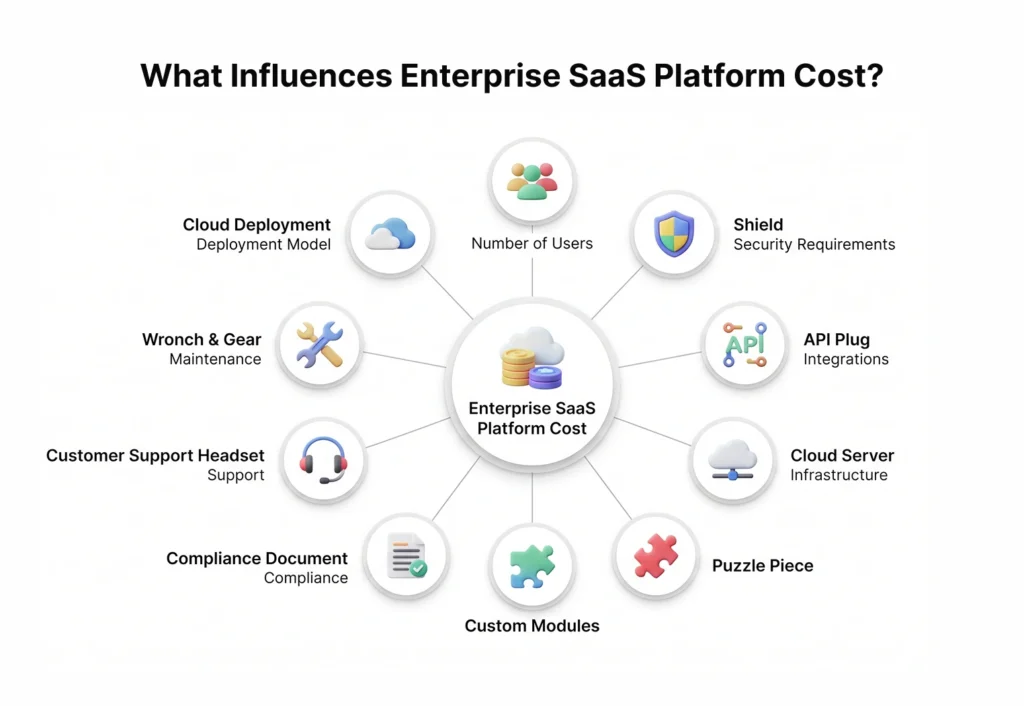
Common Challenges During Enterprise SaaS Adoption
Adoption rarely fails because the platform doesn’t work. It fails for more human reasons.
Legacy systems: Old systems, sometimes decades old, often lack the APIs needed for clean integration, forcing workarounds that undercut the whole point of consolidation.
Data migration: Incomplete or poorly structured historical data creates migration delays and, if rushed, data quality problems that surface months later.
Employee adoption: Staff comfortable with old workflows resist new ones, particularly when training is rushed or optional.
Security: Consolidating data onto one platform raises the stakes of a single breach, making security configuration during implementation non-negotiable rather than a phase-two concern.
Integration complexity: Connecting a platform to a dozen other tools is rarely as simple as the vendor’s marketing implies, especially with older or poorly documented systems.
Vendor lock-in: Once operations run entirely on one platform, switching vendors later becomes expensive and disruptive, which is worth weighing seriously before signing a long-term contract.
Performance: Platforms that perform well in a sales demo with clean sample data sometimes struggle under real enterprise data volume and concurrent usage.
Future of Enterprise SaaS Platforms
A few directions are shaping where enterprise SaaS is heading, without needing to lean on hype to make the case.
Platform consolidation continues as vendors acquire smaller point solutions to round out their offering, giving enterprises fewer, broader platforms to choose between.
Better interoperability is emerging as a competitive requirement rather than a nice-to-have, with more vendors opening up their APIs because customers increasingly refuse to buy into closed ecosystems.
Modular ecosystems let businesses adopt a platform’s core and add only the modules relevant to them, rather than paying for a monolithic suite where half the features go unused.
Consumption-based pricing is gaining ground alongside traditional per-seat licensing, particularly for platforms with significant usage variability across customers.
Governance is becoming a bigger differentiator as data privacy regulation tightens globally, with platforms competing partly on how well they help customers stay compliant, not just on features.
Industry-specific platforms are growing, purpose-built for healthcare, financial services, or manufacturing rather than generic horizontal platforms retrofitted for every industry.
None of this means every business needs to chase the newest capability the moment it ships. The platforms holding up best over time are the ones that solved a real coordination problem clearly, not the ones with the longest feature list.
Statistics Reference
- Global SaaS market valued at approximately $232 billion in 2026
- B2B SaaS market projected to reach $634.39 billion
- Enterprise software spending expected to exceed $1.4 trillion
- Enterprise SaaS spending growing 14.7% annually
- Average enterprise spends $55.7 million annually on SaaS
- Enterprises use around 305 SaaS applications on average
- 35% of organizations have replaced at least one SaaS application with an internal solution
- 78% plan to build additional custom business applications
Competitor Insights: Enterprise Platform Landscape
| Platform | Best For | Strength | Limitation |
| Salesforce | CRM | Customer management | Cost |
| ServiceNow | ITSM | Workflow management | Learning curve |
| SAP | ERP | Enterprise operations | Implementation complexity |
| Oracle | ERP & Commerce | Integrated enterprise suite | Licensing |
| Microsoft Dynamics | ERP & CRM | Microsoft ecosystem | Customization |
| HubSpot | Mid-market CRM | Ease of use | Enterprise depth |
| AWS | Cloud Platform | Infrastructure | Requires expertise |
| Microsoft Azure | Cloud Platform | Enterprise integration | Cost management |
| Google Cloud | PaaS | Data services | Smaller enterprise footprint |
Most enterprises don’t end up choosing just one of these. A common pattern is Salesforce or Dynamics for CRM, layered on top of AWS or Azure infrastructure, with ServiceNow or a comparable tool handling internal workflow. The “one platform to rule them all” pitch is rarely how it plays out in practice, even at companies that describe themselves as fully consolidated.
Conclusion
Platform consolidation isn’t really about chasing a trend. It’s about the fact that 305 disconnected tools eventually cost more in coordination overhead than they save in per-tool functionality. Scalability, integration, and security are the three things that actually separate a platform that grows with a business from one the business outgrows in eighteen months.

None of that means every company needs the most expensive enterprise platform on the market. It means the decision deserves the same scrutiny most businesses apply to a major hire: checking references, testing under real conditions, and being honest about what the organization can actually support operationally, not just what looks good in a vendor demo.
If your team is somewhere in that evaluation process, working through requirements, comparing vendors, or trying to figure out whether to build custom or buy, it’s worth talking through the specifics with a team that’s done this kind of implementation before. That conversation tends to surface the gaps a vendor sales call won’t.
FAQ’s
1. What is an enterprise SaaS platform?
It’s a cloud-based software system built to support multiple business functions under a shared architecture, identity system, and data layer, rather than a single-purpose tool solving one job in isolation.
2. How is an enterprise SaaS platform different from traditional SaaS?
Traditional SaaS tools handle one function well. Enterprise platforms connect several functions through shared user management, security policies, and APIs, reducing the data silos that come from using many disconnected point solutions.
3. What features should an enterprise SaaS platform include?
At minimum: centralized user management, workflow automation, open APIs, strong security and audit logging, role-based permissions, multi-tenancy where relevant, and mobile accessibility.
4. How much does an enterprise SaaS platform cost?
Costs vary widely by scope, but mid-market deployments often start around $50,000 to $150,000 annually, while large, heavily customized enterprise deployments can exceed $500,000 annually once implementation and integration costs are included.
5. How do enterprises evaluate SaaS security?
By checking for relevant certifications (SOC 2, ISO 27001), industry-specific compliance (HIPAA, PCI DSS), data residency policies, and the vendor’s actual incident history rather than just its stated security posture.
6. What are the biggest implementation challenges?
Legacy system integration, data migration quality issues, and employee adoption tend to cause more delays than the platform’s technical capabilities.
7. What industries benefit most from enterprise SaaS platforms?
Healthcare, manufacturing, logistics, banking, retail, education, government, insurance, and SaaS companies themselves all see strong returns, generally in proportion to how fragmented their existing software stack already is.
8. How long does implementation usually take?
Timelines vary by scope, but mid-size deployments commonly take four to nine months from discovery to full rollout, with larger, highly customized enterprise implementations often taking a year or longer.
9. Should enterprises choose one platform or multiple SaaS tools?
Most mature enterprises land somewhere in between: a core platform for shared functions like identity and reporting, connected to a smaller number of specialized tools for functions the platform doesn’t cover well.
10. What are the best alternatives to traditional ERP software?
Cloud-native enterprise SaaS platforms, modular best-of-breed stacks connected through strong APIs, and industry-specific vertical SaaS platforms are the main alternatives businesses are evaluating instead of legacy ERP systems.