
Key takeaways
- How to fix slow websites starts with identifying performance bottlenecks such as unoptimized images, slow hosting, and inefficient code.
- Regular speed testing helps uncover issues like render-blocking resources, large media files, and excessive third-party scripts.
- Optimizing hosting, compressing assets, and reducing unnecessary plugins can significantly improve page load time.
- Responsive layouts and clean UI decisions support faster performance across desktop and mobile devices.
- Website speed optimization should be treated as an ongoing process, not a one-time fix.
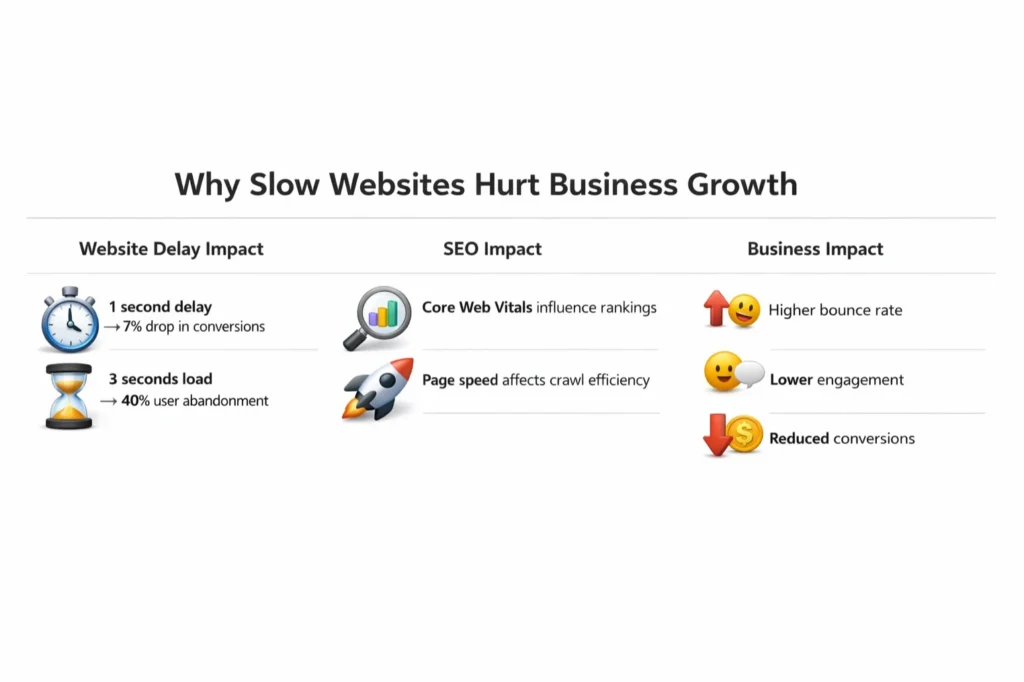
A slow website does more than frustrate visitors. It also costs businesses real revenue. Many studies show the same pattern showing that conversion rates decrease by as much as 7% for every 1 second of page load delay. For e-commerce platforms, media publishers, and service-based businesses, that adds up quickly across thousands of daily sessions.
A third of all visitors leave before they even see a line when any page takes above three seconds to load. Website loading speed directly contributes to ranking decisions in search engines, particularly Google. Hence, the user experience does not only rely on a good performance. It stealthily siphons off your search visibility, steals your brand authority, and caps your long-term growth.
Many businesses struggle to identify the real cause of slow performance. In most cases, one issue does not create the problem. Instead, several development, design, and infrastructure decisions combine over time lifecycle, along with design-level nuances or errors. And some of these issues are just downright simple to resolve. Some issues require a deeper architectural rebuild because the platform’s original design creates long-term performance limitations.
This guide, informed by our insights, walks through the most common causes of slow websites, a practical step-by-step optimization process, and the tools and strategies that help businesses make meaningful, lasting improvements.
Importance of Website Speed for Business Growth.
Website loading speed is not just a technical concern. It affects user experience, search visibility, and overall platform performance.
A page that loads slowly will only result in an increase in bounce rate, a decline in time on site, and a direct reduction in revenue potential. As page load time increases from one to ten seconds, the probability of a mobile visitor bouncing increases 123%, according to Google. These are not marginal shifts. These indicate a core disconnect in the user experience.
Speed also signals trustworthiness. Users often view fast-loading platforms as more reliable and professional. A beautiful interface still fails when it loads slowly. Users often see that delay as a sign of poor quality.
Google uses Core Web Vitals to evaluate user experience signals. These metrics influence search rankings. Businesses that prioritize Business website development with performance in mind often outperform slower competitors.
Performance upgrades bolster your tech stack + nest into a larger digital growth strategy / consumer messaging Organisations that always have an edge on competitors online, are those who practise Corporate website development as a continuous discipline rather than as a one-off project.
Common Causes of Slow Websites
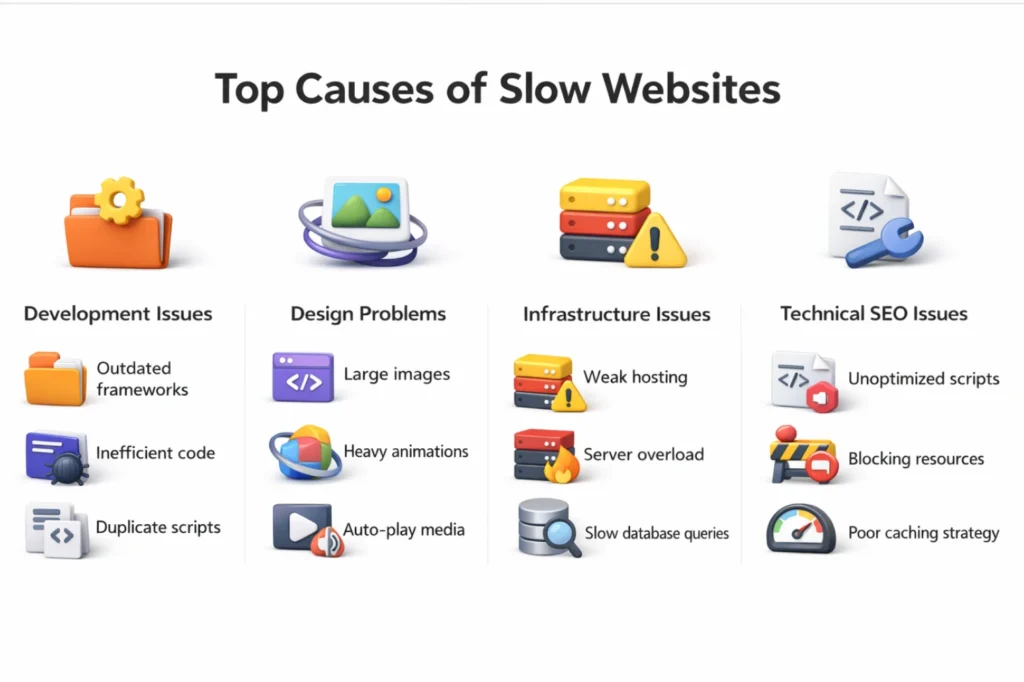
The first step to learning how to fix slow websites is understanding what is causing the problem. A lot of performance problems arise from unnecessary structural decisions made during development, bad infrastructure choices or design-first without thinking of load efficiency.
Poor Development Architecture
This applies to inefficient code, poorly structured databases, or just using outdated frameworks. If the architecture of the application is not optimized, requests to the servers become numerous, loading pages takes a long time, and users wait.
Organizations can partner with a website development company or a reputed web development company in Chennai that has development norms in place that prioritize performance from the grass root level. Performance issues are much easier to prevent than to fix later on with PD tools which is why integrating best practices as early as possible in the development process is of utmost importance.
Heavy Media and Design Elements
One of the most common causes for slow websites that is also the easiest to prevent are large, uncompressed images. Even if all the rest of the code is clean, high-res graphics, autoplay videos, and animation-heavy interfaces can significantly bloat a page.
Always load media that is high on visual quality but low on load with image compression, lazy loading and adaptive layouts. Responsive website development and Modern Website UI UX Practices guide principles that lead to design decisions that complement rather than compete with performance.
How To Fix Slow Websites: A 10-Step Workbook
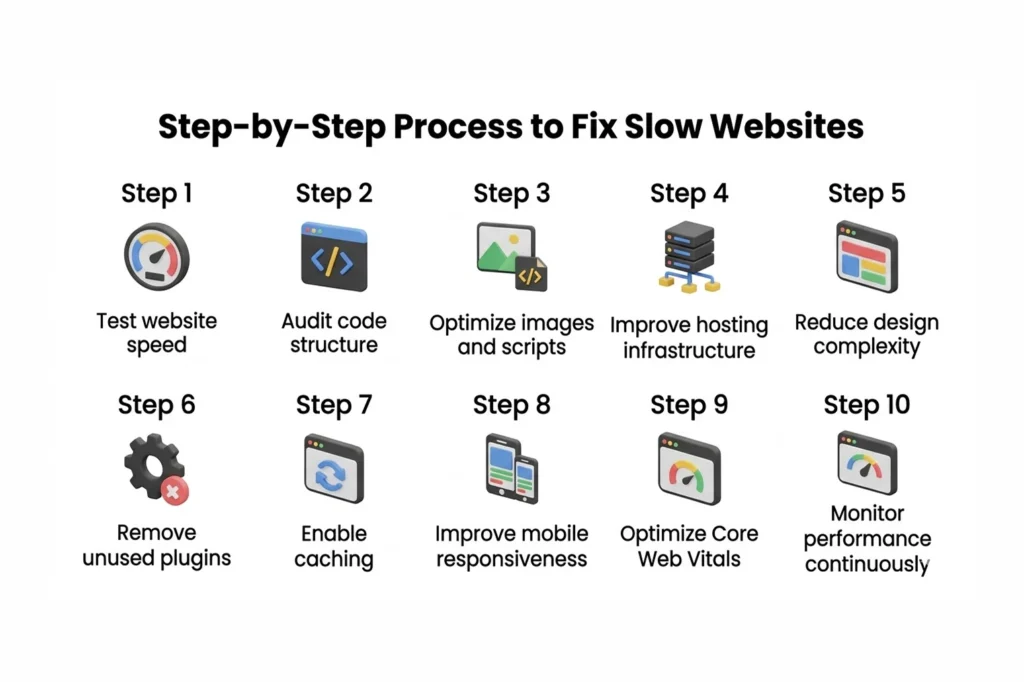
Companies that take a structured methodology towards how to fix slow websites always outperform those that apply fixes on a whim. The following is a functional process to direct that effort.
Step 1: Test Website Performance to Fix Slow Websites
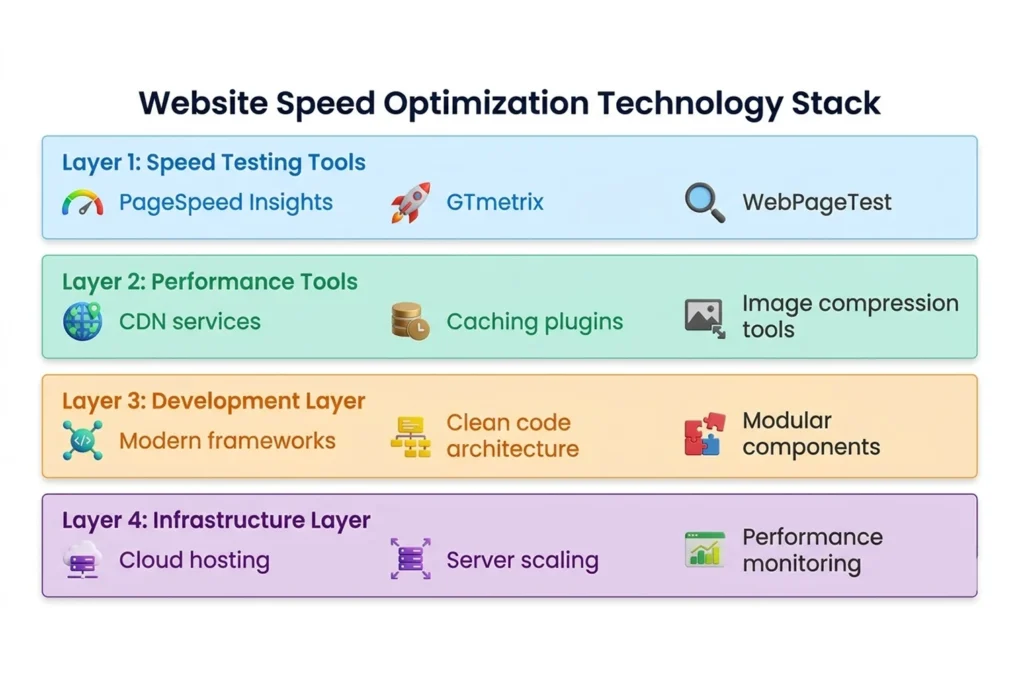
Set a baseline before making any changes. Choose a performance testing tool such as Google PageSpeed Insights, GTmetrix, or WebPageTest to help you test your current loading times. These platforms pointed out particular problems like the delay in server response, Render-blocking scripts, oversized resources, etc.
Web development tools can provide insights into choke points that might get lost in routine maintenance. By performing tests on multiple devices and network conditions you get a full view of where performance fails.
Step 2: Review Development Structure for Faster Website Performance
When you have written down the most important pain points, you should take your application architecture and coding standards into consideration. Search for duplicate scripts, unoptimized database queries, and unused dependencies.
Modular coding approaches, supported by modern web development frameworks, limit redundancy of effort, thus increasing maintainability and allowing for easier scalability with increasing web traffic. Usually, updating or simply replacing outdated frameworks is also one of the integrations with a high impact on making the app work better on the code.
Step 3: Optimize Images to Improve Website Loading Speed
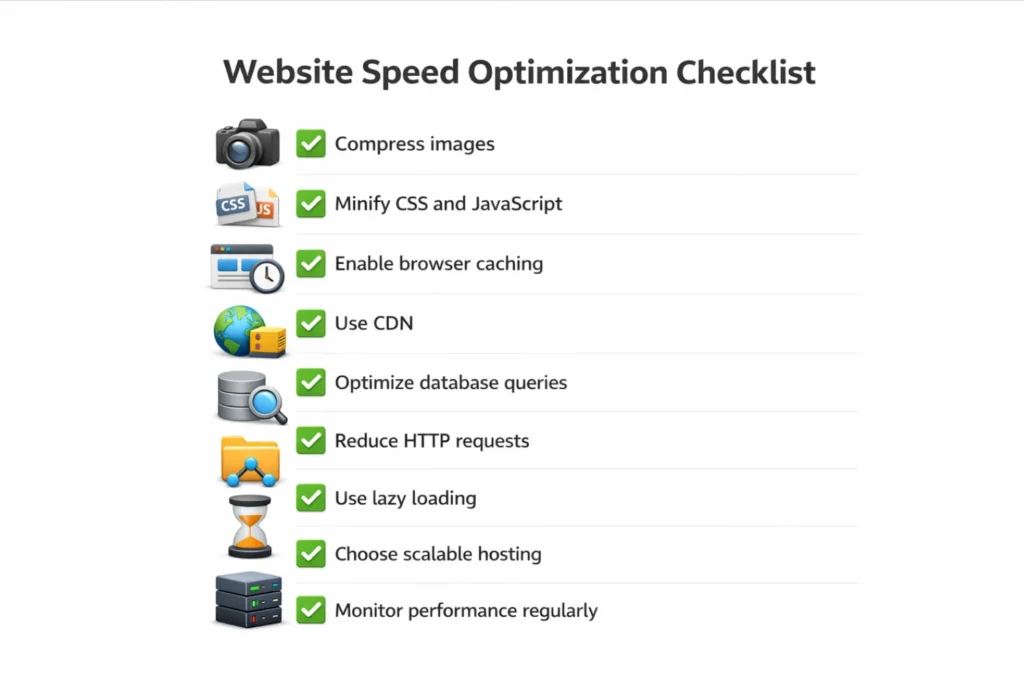
A significant portion of page weight in most websites is due to images. High-res images that are never properly compressed or shrunk can cause dramatic delays in page rendering, especially over mobile connections.
Step 4: Reduce Third-Party Scripts That Slow Down Websites
External requests added by analytics tools, live chat widgets, advertising scripts, and marketing integrations to your page load cycle. This requires an additional network call per script, introducing latency that gets compounded on top of an integration.
Step 5: Improve Hosting to Fix Slow Website Issues
Even the most well-coded website will perform poorly if it is hosted in an inappropriate or misconfigured environment. In particular, shared hosting environments can introduce performance variability during traffic surges.
Step 6: Optimize Website Code for Better Page Speed
Minifying CSS, JS, and HTML files helps smaller file sizes and faster delivery. Cleaning unused code, not using multiple scripts if possible, and decreasing the amount of server requests to render a page will increase throughput.
Step 7: Improve Mobile Responsiveness for Faster Loading
Web traffic from mobile devices reaches over 50% of the global web traffic. Inefficient architectures can cause mobile browsers to load a desktop version of a website, which tends to be much heavier and slower.
Step 8: Simplify UI Design to Improve Website Speed
Browsers have to work hard to render complex visual elements. Big animations, several custom font loads, and script-heavy interactions will all increase the time it takes to render a fully interactive page.
Step 9: Fix Structural Errors That Cause Slow Websites
Technical debt comes up over the years Websites accumulate tech debt attributes. Legacy integrations, outdated pieces and architectural decisions that worked well at launch can all become performance liabilities as the platform develops.
Step 10: Monitor Website Speed and Loading Performance Regularly
Site speed does not have a flip-the-switch approach. Patterns in traffic change, content is added, and third-party services evolve in ways that can gradually reinstate speed problems again. Regular use of an analytics platform and index performance dashboards catches degradation early.
Hosting Improvements to Fix Slow Website Performance
Hosting quality is one of the most neglected factors when it comes to how to fix slow websites. A well-optimized website can crash and burn on an underpowered or misconfigured server setup.
Choose Scalable Hosting
If your website is having relatively a constant growth for years then the Cloud based website hosting can provide a performance exceptional boost. Workloads are spread across multiple servers, single points of failure are avoided, and vulnerable infrastructure dynamically expands in response to large demand spikes. Thus, they are especially ideal for companies with a variable traffic flow.
Align Infrastructure with Development
Infrastructure has to be aligned with development. We often introduce avoidable performance bottlenecks due to a mismatch between the application and its environment technical requirements. With custom web application development, it often grooms the platform in a way that some customization is embraced even at the level of hosting structure according to the application needs. A generic, one-size-fits-all hosting approach will almost never yield the best results when it comes to any purpose-built platform.
Optimise the design of the site and the user experience
Performance is directly and measurably affected by design decisions. Page speed is adversely affected when dev teams focus on making high-fidelity designs without considering how to load efficiently. Designing with performance in mind may sound like shortchanging aesthetics, but the good news is that it doesn’t have to be.
Reduce Interface Complexity
Using simpler layouts, relying less on third-party scripts, and choosing fonts carefully all increase the rendering speed. Applying best practices from UI and UX design helps teams make design decisions that serve both usability and performance simultaneously.
By leveraging professional user experience design services it can be assured that the interface is not just visually effective, but optimized technically also. Good UX people know how design decisions affect loading behavior, and will help the team strike the right balance of looks and performance.
Avoid Common Development Errors
Most websites slow down over the years due to problems that were introduced during development and never really resolved. Common Website Development Mistakes Site performance issues often lurk beneath the surface, only to later compound into deeper problems. Finding these errors early is far less expensive than trying to remediate them after the fact.
Adhere to a Website Development Process
Performance tuning should not be an afterthought close to launch day. It should be integrated in every level of the development life cycle, from planning and architecture to testing and deployment.
Well disciplined website development teams tend to stay away from the big speed issues that come up when performance is an afterthought. Set coding standards, hold performance reviews at major milestones, and integrate testing into the natural flow of work.
Understanding website development trends also enables teams make educated decisions on which technologies to embrace, and which outdated approaches to phase out. Digital landscape changes quickly and a stale platform can both be a performance gap and security risk.
Design Changes That Improve Website Loading Speed
In some cases, making changes to save what still works is just impossible. Legacy platforms based on longtime bygone architecture can hit a point where it is cheaper to excavate and rebuild than continually patch the problems.
A full website redesign tackles the root structural problems in ways that incremental solutions cannot. It also provides room to include up-to-date performance requirements, modern design concepts, and scalable infrastructure from the beginning.
When modernizing digital platforms, businesses either research on web development services in Chennai or look forward to partnered with an established website development company in Chennai. On the more forward-looking side, these partnerships tend to be focused on rebuilding platforms with optimized performance, scalability, and usability as primary goals, instead of bolting extras on a legacy foundation.
Tools That Help Fix Slow Websites
As long as you have the right tools, the optimization process is much easier. Businesses researching how to fix slow websites can draw on a strong ecosystem of modern performance tools that analyze load times, resource usage, and rendering behavior across devices.
We have resources like best tools for responsive web design to make sure design teams can maintain layout performance over screen sizes without sacrificing visual experience. Mobile responsiveness is a growing consideration, given that more than half of all web traffic occurs on mobile devices.
Apart from that, developers also use SEO friendly website development tips to make sure that the performance improvements meet the needs of search engines. Since speed affects SEO, the improvements made for page speed should strengthen your organic strategy rather than replace it.

Build Performance Into Every Decision
The way to fix a slow website is almost never identifying a single problem and fixing it. This means a methodical re-audit of development architecture, hosting infrastructure, design decisions and maintenance practice.
The long-term successful online businesses are the ones that regard performance as a constant, iterative process rather than a one-time fix. Test your current performance, find your most impactful problems, and follow the optimization steps in this guide.
If structural problems run deep, then delegating work to a development team with experience can rebuild on solid ground. Over time, the return on investment is evident in terms of improved conversions, better rankings, and greater trust from its users.
FAQs
1. How do I fix a slow website quickly?
Start by testing your site speed, compressing images, enabling caching, and reviewing hosting performance. These changes can significantly reduce load time.
2. Does hosting affect website speed?
Yes. Low quality hosting environments increase server response time and limit scalability.
3. Can website design slow down a site?
Yes. Heavy graphics, animations, and complex layouts can significantly increase page load time.