
Key takeaways
- Common website development mistakes like slow speed, poor mobile responsiveness, and weak SEO structure directly reduce traffic and revenue.
- Ignoring mobile-first design is one of the most damaging common website development mistakes as Google ranks sites based on mobile usability.
- Technical errors such as large images, bad hosting, and bloated code increase bounce rate and hurt Core Web Vitals.
- Skipping discovery, QA, and documentation leads to expensive rebuilds and long-term maintenance problems.
- Fixing common website development mistakes with structured audits, SEO planning, and performance optimization turns a website into a revenue asset.
When you launch a new website, the enthusiasm can quickly turn into frustration when the traffic doesn’t come and the leads don’t result into sales. You might have a cool design and an attractive domain name, yet the phone stays quiet. Businesses who don’t pay attention to the basics of their online presence see this happen all too often. Avoiding common website development mistakes is the only way to ensure your investment actually pays off rather than becoming a digital paperweight.
At CodeNeptune, we see this all the time. Business owners sometimes put looks ahead of speed or usefulness, which might result in a product that appears excellent but doesn’t work well. A website is a complicated machine with a lot of moving parts. The complete system stops working if one gear is out of place. We will go over the most important mistakes that might ruin projects in this guide so that you can make a site that really helps your business expand.
Common Website Development Mistakes That Damage Performance
The engine of your website is equally as important as the paint job. If your technical basis isn’t strong, Google will punish you, and users will leave before the website even appears.
Not caring about how fast a website loads
On the internet, speed equals money. People expect a site to load in less than two seconds. They depart if it takes longer. The Core Web Vitals change from Google makes speed a direct ranking element. This means that a slow site doesn’t simply frustrate people; it also makes it harder for people to find you in search results.
A lot of developers don’t think about optimising assets. They upload huge photos or use code libraries that are too big, which slows down speed. From the very beginning, you need to make website loading speed a top priority. This means using browser cache well, compressing images, and minifying CSS and JavaScript.
Seeing the Cost of Speed
| Time to Load | Chance of Bounce |
| 1 to 3 seconds | Rises by 32% |
| 1s to 5s | Goes up by 90% |
| 1s to 6s | Goes up by 106% |
| Source: Data from Google Research | |
Non-Responsive Development Method
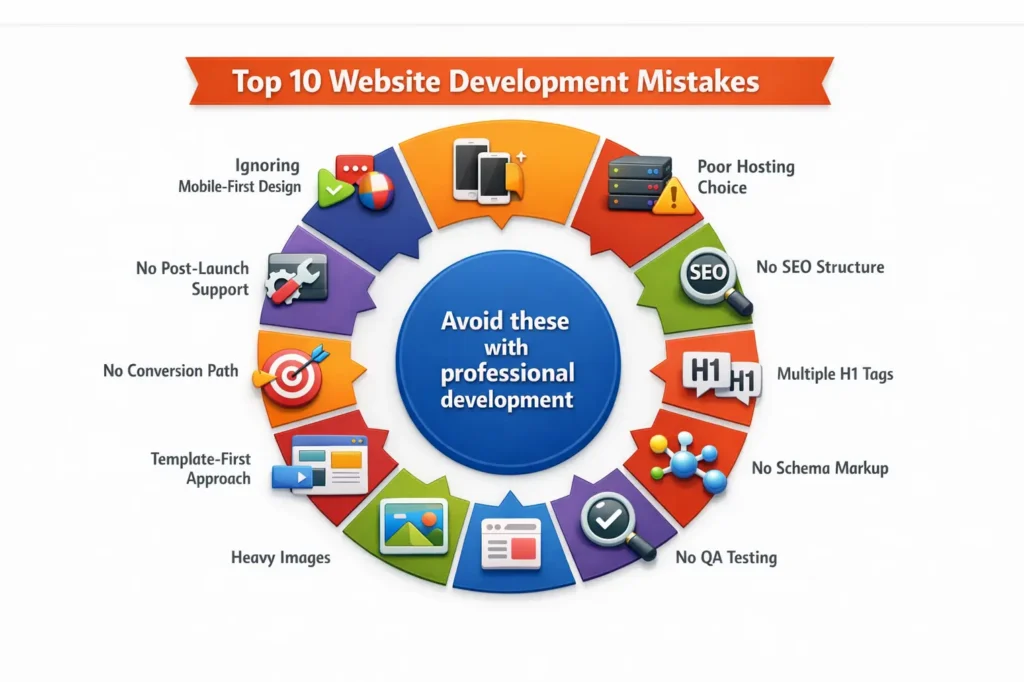
More than half of all web traffic currently comes from mobile devices. If your developer makes the desktop version first and only then thinks about the mobile version, you are going to fail. With mobile-first indexing, Google checks your mobile site to see where you rank. If the mobile version is hard to use, it hurts your SEO all around.
You have to do cross-device testing. Your site needs to work perfectly on an iPhone, a Samsung Galaxy, an iPad, and a monitor with a big screen.
Bad Hosting and Infrastructure
You shouldn’t just choose the cheapest hosting plan since it’s a commodity. Shared hosting could save you a few dollars a month, but it might also slow down your site because other sites are on the same server.
Cloud-based website hosting is more reliable and scalable for sites that are important to business. It makes sure that a sudden increase in traffic leads to sales instead of a server meltdown. There are genuine risks of downtime, and every minute your site is down costs you money.
Design Related Common Website Development Mistakes
A designer’s 27-inch monitor might make a site appear great, but a laptop might wreck it. Design must work on all viewports.
Not Following Responsive Standards
Breakpoints are important for responsive design. These are the exact pixel widths where the layout changes to fit the size of the screen. One of the common website development mistakes is ignoring intermediate breakpoints. The site looks good on phones and desktops, but on tablets, the text overlaps and the pictures are blurry.
Choosing the Wrong Tech Stack for UI
The tools you employ to make your interface set its limits. Some developers use heavy frameworks that are too much for a simple business site, making things more complicated than they need to be. Some people still use old libraries that aren’t supported anymore.
To choose the best Responsive website development method, you need to find a balance between style and technological effectiveness. The best tools for responsive web design allow for fluid layouts that adapt naturally without requiring heavy custom code for every single device variation.
Technical Common Website Development Mistakes to Avoid
The way you build is just as essential as what you build. If you don’t have a plan, your site might not be able to grow with your business.
First Template, Then Strategy
Templates are appealing since they are cheap and easy to use. But they typically come with a lot of other features that you don’t need and don’t have the exact ones that you do. A template makes your content fit inside a box that has already been made. A strategic approach puts your content and business goals in a box.
No architecture that can grow
In three years, your business will appear different. Can your website take it? If your site is hard-coded and doesn’t have a content management system (CMS) or is built on a platform that doesn’t let you change it easily, you may need to rebuild it completely to add a new product line or service area.
Choosing the Wrong Platform
Choosing between a CMS like WordPress and a bespoke build with React is a very important choice. Custom website development vs template-based services comparison is a necessary exercise during planning.
A typical CMS is great for a lot of sites that have a lot of content. You need something stronger for web apps that change all the time. If you know the pros and cons of React vs WordPress for business websites, you can choose the correct one for the job and save money on maintenance later.
SEO Driven Common Website Development Mistakes
You can’t just add SEO after the site is live. The code structure itself must include it.
Bad structure on the page
Search engines can read code as well as text. Google doesn’t know what the order of your content is if you utilise your heading tags (H1, H2, H3) for decoration instead of structure. One mistake people often make is having more than one H1 tag or going from H2 to H4 without going via H3 first.
No Schema or Metadata
Schema markup makes it easier for search engines to comprehend what your content is about. It tells Google that a series of numbers is either a phone number or a date for an event. If you ignore this, you won’t see rich snippets in search results.
Bloat in images and code
We talked about speed before, but the cleanliness of your code also affects how easy bots can explore your site. Modern web development frameworks can be useful, but only if you know how to use them. When you utilise too many plugins or third-party scripts, it makes “bloat” that crawlers can’t understand. Using the right web development tools makes sure that the backend code is clean and makes sense.
Business Impact of Common Website Development Mistakes
If you don’t have a business plan, your website is merely a digital brochure. It could look good, but it won’t help you pay your bills.
No Clear Business Goals
Think about this: Does your homepage make it clear what you do in five seconds?
Your strategy is not good if you can’t say yes. Many firms list features but don’t explain how they help the customer.
Lead Flow Not Set
Once a user lands on your site, where should they go? Business website development must map out user journeys. If a visitor reads a blog post, the next step should be obvious, whether that is downloading a whitepaper or booking a call.
No Path to Conversion
You need more than just a “Contact Us” page. Corporate website development should include soft conversion points for users who are not ready to buy yet. This might be a free tool or a way to sign up for a newsletter. If you don’t have these, you’ll lose most of the visitors who are still doing research.
Process to Fix Common Website Development Mistakes
Before any code is written, things can get very messy. Not going through the planning steps is a surefire way to fail.
Not going through the Discovery Phase
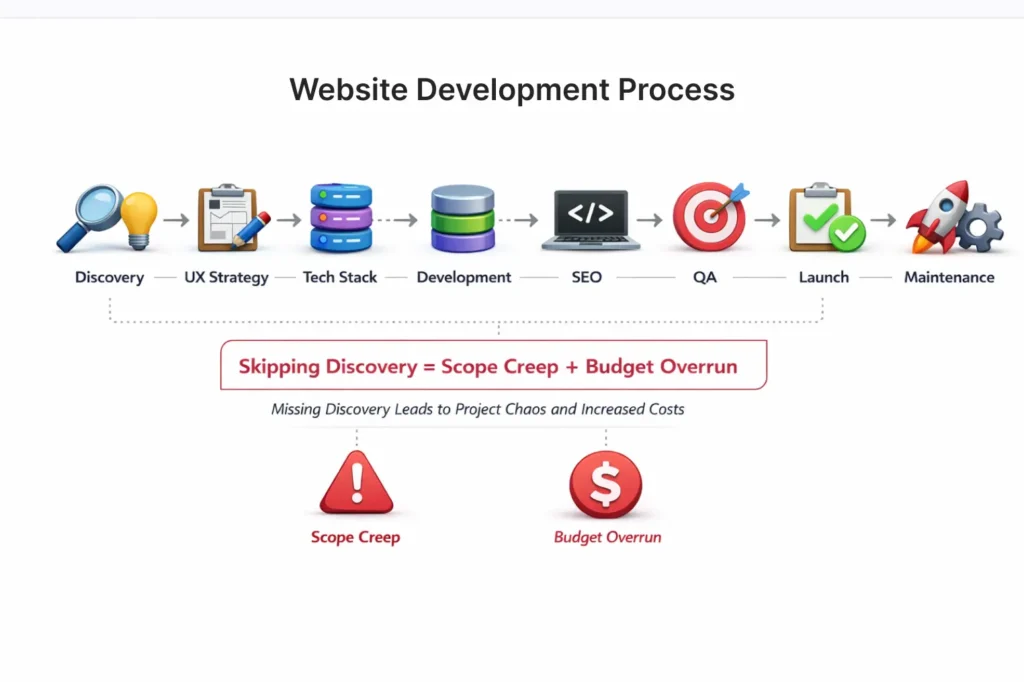
We figure out who the audience is, who the competitor is, and what the technological needs are during the discovery phase. Skipping this to save money is one of the most dangerous common website development mistakes. It always leads to scope creep, which is when new needs come up in the middle of a project and exceed the budget.
A structured website development process acts as your roadmap. You wouldn’t build a house without blueprints, so don’t build a site without a discovery document.
No Paperwork
Can someone else take over if your developer is hit by a bus? If you don’t have documentation on the code and server settings, your original vendor has you hostage.
No QA Before Launch
Launching without Quality Assurance (QA) is like selling a car without testing the brakes. Broken links, typos, and forms that do not submit destroy trust immediately. Knowing how to choose website development company involves asking about their QA protocols. Do they have a tester on staff, or do they expect you to find the bugs?
Common Website Development Mistakes in planning costs and budgets
Websites that are cheap cost a lot. The first price is not usually the whole cost of ownership.
Picking Based Only on Price
You usually get what you pay for. You will probably have to replace a $500 website within a year. Investing more up front in good coding usually means cheaper maintenance expenses and more money coming in.
Not Thinking About Long-Term Costs
It costs money to host, buy plugin licensing, install security patches, and add new content. When you ask how much does a custom website cost, you should include both operational expenses (OpEx) and capital expenses (CapEx).
Rebuild vs. Fix Confusion
There are situations when a legacy site is too broken to fix. It costs more to fix a terrible codebase than to start over from scratch. You may reset your technological debt and construct a strong base that will last with custom website development.
Ecommerce Common Website Development Mistakes
Friction in ecommerce means lost sales. Here, the stakes are higher than anywhere else.
Bad UX for the product
Users should be able to swiftly find what they desire. Bad filtering, low-quality photos, and hard-to-understand navigation hurt sales. It should be easy to use the user experience (UX).
Problems with the flow of payments
If the checkout process is hard or takes too long, a lot of people will leave their carts. Guest checkout is very important. Forcing account creation before purchase is a major conversion killer in ecommerce website development.
No optimisation for performance
An online store with hundreds of items might slow down very quickly. It’s important to optimise databases and make queries run quickly. To manage a lot of inventory without slowing down, you often need to use custom web application development methods.
Common Website Development Mistakes in Choosing a Vendor
The people you hire will make or break the project. A lot of companies have trouble checking out technical partners.
Vendor Selection Common Website Development Mistakes
Don’t just look at the pictures. Check out the live sites in their portfolio. Try them out on your phone. Are they quick? Do they work? This is the only genuine indication that someone is good at something.
Post-Launch Common Website Development Mistakes
A website is never “done.” It has to be updated and have security patches. You are at risk if your vendor goes out of business after launch. Top web development firms offer continuous maintenance packages to keep your site safe.
SEO Capability Common Website Development Mistakes
A lot of developers are good at writing code but bad at marketing. If your vendor doesn’t know SEO, they could accidentally block search engines or set up the site in a way that makes it hard to find. The best website development company in India or anywhere else will always have SEO professionals on staff or work closely with them.
Common Website Development Mistakes on Regional Business Websites (Chennai Focus)
Businesses who work in certain centers, like Chennai, shouldn’t ignore what’s going on in those areas.
Regional Audience Common Website Development Mistakes
Does your site fit in with the way people talk and act in your area? A generic multinational style could turn off local customers who appreciate connection and familiarity. A web development company in Chennai knows these things better than a team that works from another country and doesn’t know the area.
Local SEO Common Website Development Mistakes
You need local schema, Google Business Profile integration, and content that is relevant to your area in order to rank for “near me” searches. A generalist approach won’t work. If you work with a website development company in Chennai, they will make sure that these unique geographical indications are built into your plan.
How professionals stay away from Common Website Development Mistakes
The way that an amateur builds something is different from the way that a professional does it.
Model for Structured Development
Professionals don’t make guesses. They keep track of progress and make sure everyone is responsible by using agile methods or waterfall models. This stops the “black box” situation when clients don’t know what’s going on.
Safety and Upkeep
Question to Think About: When was the last time you checked your website’s backup?
You are in danger if you don’t know. Professional organisations use automation to back up data and scan for security threats.
Improving Conversion
When professionals build, they think about the overall aim. They change the design based on data and heatmaps. The Top 10 website development companies in Chennai stand out because they care about more than just code. They care about return on investment (ROI). A reliable website development company views your site as a revenue generator.
30-Day Fix Plan
Don’t worry if your site is already live and having these problems. This is a plan for getting better.
The Roadmap to Recovery
- Week 1 (Technical): Check your Core Web Vitals. Make all the pictures smaller. If the server response time is more than 600 milliseconds, upgrade the hosting.
- Week 2 (SEO): Repair links that don’t work. Put meta titles and descriptions on all of the important pages. Put fundamental concepts into action.
- Week 3 (UX): Try out your site on three different mobile devices. Make the navigation menu easier to use. Put a clear call to action in the hero section.
- Week 4 (Growth): Set up Google Analytics 4. Make targets for conversions. Use the questions people ask to plan your first piece of content.
This plan will help you go from broken to working. Taking action today stops the bleeding, whether you need custom website development to start anew or a strategic website redesign to remedy problems you’re having now.
FAQs
1. What are some typical mistakes that web developers make?
The most common mistakes are images that aren’t optimised, which slow down loading times, websites that don’t work well on mobile devices, and bad code structure that makes it hard for search engines to crawl.
2. Why is it vital to have responsive design?
Responsive design makes sure that your site functions on all devices. Since most of the traffic comes from mobile devices, it’s important to design a Responsive website to keep users and improve Google ranks.
3. How often should you change the look of your website?
Most of the time, a website should be updated every three to four years. But this relies on how quickly your business goals and technology change.
4. What makes a website load faster?
The main problems are big media files, cheap hosting servers, and too many plugins. To make a website load faster, you usually need to optimise its code and assets.