
Key takeaways
- Strong mobile app UI/UX design tips improves usability, retention, and overall product engagement.
- Thumb-friendly navigation, reduced cognitive load, and clear feedback loops make mobile apps easier to use.
- Platform-specific design choices for Android and iOS help users interact more naturally with the app.
- UI/UX decisions should support performance, accessibility, and real business workflows across the full app lifecycle.
- Modern mobile app design trends should be evaluated based on usability and product goals, not just visual appeal.
Most mobile apps fail quietly. It is not about missing features but the small design decision turned out to be an awful experience like an onboarding flow that is confusing, a navigation bar that is too distant from the thumb position or a loading screen without any feedback. After all, those who leave do not write reviews explaining to you “why”. They just uninstall the app and leave.
For product teams, building mobile applications today is more complex than it first appears. Technical performance can be tested, features scoped, but usability, the way a real human interacts with your product, is much harder to measure and much, much easier to misjudge. It doesn’t take long for confusing navigation, inconsistency in visual language, and a cluttered interface to erode trust. But there isn’t a way back when the important topic of trust is breached.
Expectations from users have also evolved quite a bit. Today, users judge an app within moments based on its speed, intuitiveness, and availability. This appears to be the reality, and our ui ux design methodology corroborates this. Design is not an add-on but a part of how an app works. Therefore, our team considers design to be one of the core functions of every product we build. All of the mobile app UI/UX design tips are based on our expertise and serve to provide assistance to the teams to build apps that users immediately comprehend and support the app for the long run. These same principles in practice can also be seen in our ui ux design services for saas products.
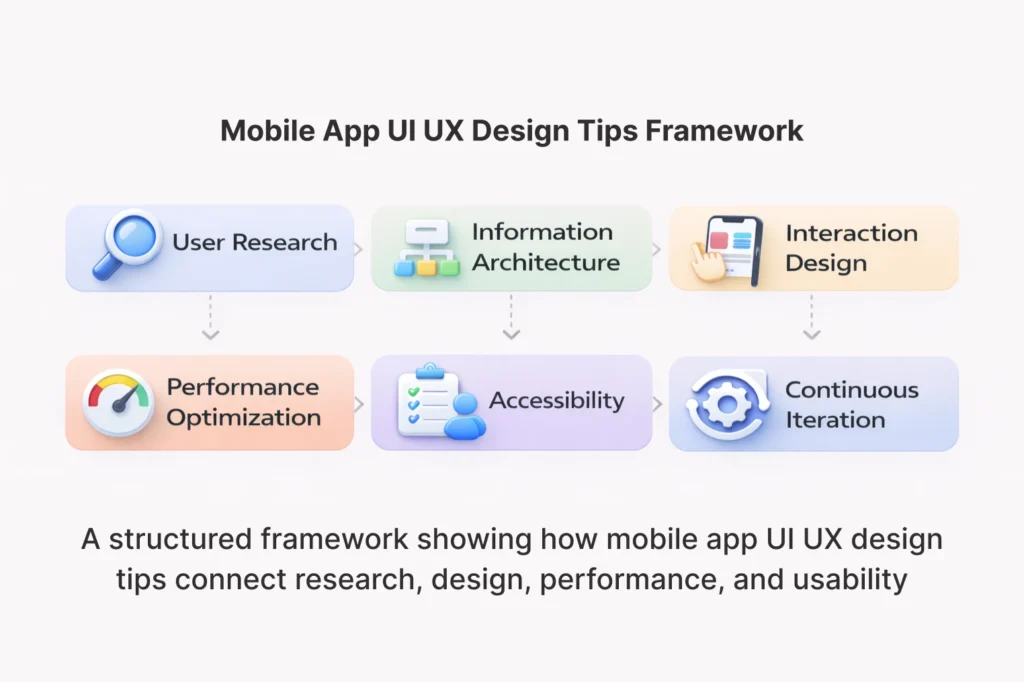
Importance of UI UX Strategy in Mobile Apps
In mobile apps, each design decision comes with a consequence. Typography affects readability. Button placement affects task completion. Since users leave immediately after their first session depending on onboarding flow.
Tech companies partnerships with strong ui ux design company understand that design strategy and business strategy will never be separated. In practice, retention improves when users can reach their goals without friction. How do you define an intent to action that means a conversion? Likewise, shorter paths between user intent and action usually lead to higher conversion rates. When the experience is felt in a consistent and meaningful manner, customer loyalty increases. Even if your app is running fine at a technical level, bad design leads to friction for users, and its effects compound over the long term. We shape our user experience design services around narrowing the difference of what users expect from a product & what it actually solves.
App Interface Design: The Role of Product Thinking
Real user tasks and real business goals are always what UI and UX decisions exist to serve. And this is where product thinking (or inside out thinking) becomes important. An isolated design team may produce beautiful looking interfaces, that simply do not help with the real workflows the user needs to accomplish. A product design agency for startups can gain consensus on design-producing decisions that impact metrics like drop-off, task completion rates & time to value for new users being short.
Mobile App UI/UX Design Tips to Enhance Usability
Making an app look simple is not how usability works. We are talking about the ease with which users can perform the complicated interactions. Some of the best mobile app UI/UX design tips focus on clarity, focus, and minimizing the number of steps between the user and their goal. With our mobile app development services, UX thinking comes with every sprint (not just with wireframe alone). The right mobile app development company should approach design as a living discipline vs a deliverable.
Mobile App UI/UX Design Tips for Thumb-Friendly Navigation
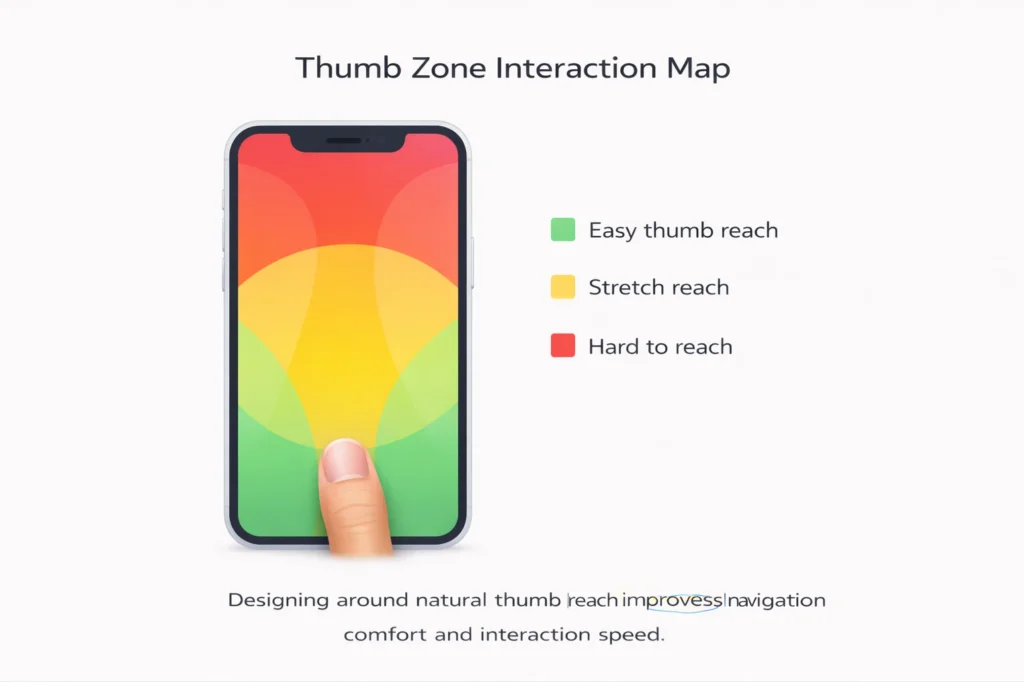
One thumb research principle The thumb zone principle made famous by UX researcher Steven Hoober determines which areas of a phone screen are comfortable for a user to reach using one thumb. Typically, the easiest area to reach is the lower center and bottom edge of the screen. By contrast, the upper parts of the screen are usually the hardest to reach with one hand. Reducing physical effort and powering interactions quickly, Primary navigation and core actions and other commonly used controls are best kept in the natural thumb arc. This is also a design consideration, one that is data-driven, an ergonomics-driven feature that directly relates to real-world use and how an app feels in actual usage.
Mobile App UI/UX Design Tips to Reduce Cognitive Load
Cognitive load is about how much brain power it takes to use an interface. When load is heavy, we make errors, get frustrated, and quit. To reduce cognitive load, teams should use clear visual hierarchy, progressive disclosure, and lean layouts that show only the most relevant information at each step. Displaying too much at once to your users is hardly ever the best option. It maintains manageable screens and straightforward choices through revealing information in increments depending on what stage of the journey someone is at.
Design Principles for Platform Specific to Android and iOS
Users have different expectations because of years of platform-specific conventions on Android and iOS. For example, Material Design patterns are something almost every Android user recognizes, such as floating action buttons, bottom navigation bars, and card-based layouts. On the other hand, iOS users are accustomed to interfaces designed according to Apple’s Human Interface Guidelines, which offer crisp text, fluid animations, and gesture-based navigation.
By creating an app that adheres to these conventions, the learning curve is lower for users and the product conveys that it has a rightful place on the device. We used platform guidelines as the basis, a constraint that our android app development and ios app development teams, combined with creative team to build on top of native conventions while allowing some room for brand expression.
When Should You Utilize Native Design Elements
Native UI components such as standard buttons, input fields, and navigation bars come with accessibility support, familiar interaction patterns, and better performance. As a result, they reduce development effort and make interactions feel more seamless for users. While custom components can be suitable for personalized experiences, they should be used sparingly where they provide evident user benefit as opposed to visual delight.
Cross-Platform Design Considerations
Developing for both platforms require compromises. While native development provides the most platform-specific integration, it also increases development cost and timeline. Cross-platform approaches are the gems for efficiency and cost, however they put developers in a delicate situation if they want to provide consistency across devices. We are an ios and android app development company but our partnerships with a leading cross platform app development company allow product teams to approach their goals within a given timeline and for a specific audience.
Understanding Cross-Platform Architecture
Early architecture decisions can affect UX all the way through to fuzzies delivered post release. So, before you build upon a framework, understanding choices and their design implications is crucial. Cross Platform App Development Explained tackles the top frameworks and what they mean for your design flexibility, performance, and long-term maintainability.
UI UX & Decisions At Different Stages of App Development
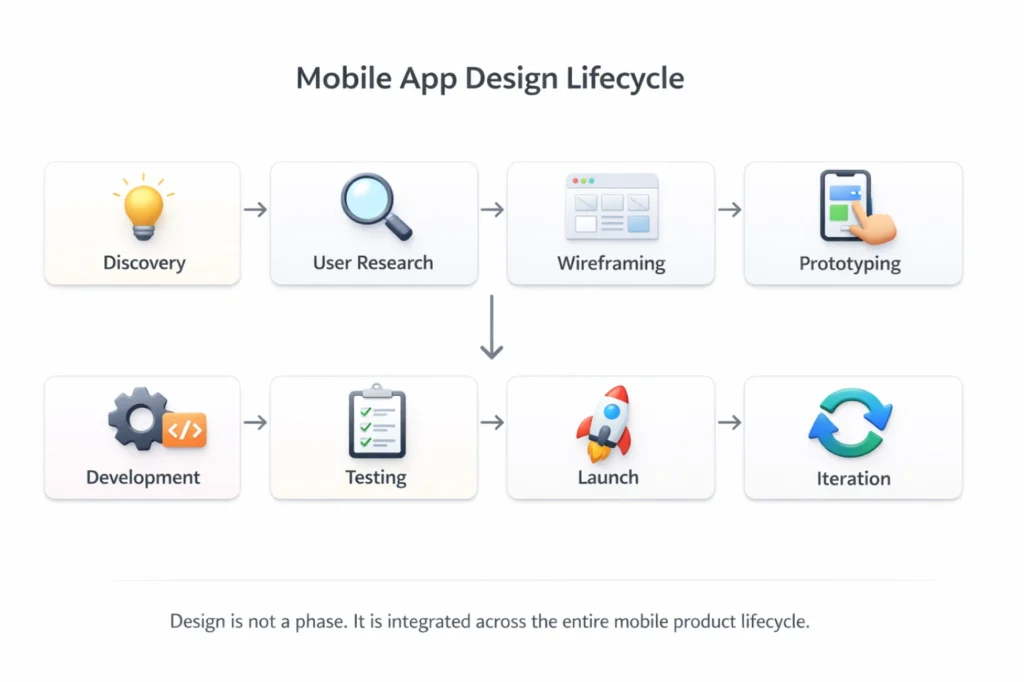
Design is not a phase. It is a common theme that flows through each developmental stage. Design and design decisions guide the progression of a product continuously from discovery workshops and user research through prototyping, development sprints, and post-launch iteration. The App development lifecycle explained outlines how these stages connect. You need to make the right design choices as early as possible when building MVP Mobile Apps, because you cannot overbuild but rather have the product learn from actual user voyeurism and adapt accordingly.
Designing MVP Apps Without Overengineering
An MVP Is Not A Lean Product Seasoned MVPIs not a lean product, an MVP is a centered one. At this stage, MVP design should focus on the core user flows that validate the product and execute them as well as possible. Instead of packing every feature into version one, focus on a few high-quality user flows. An MVP with three strong flows will usually outperform an app with fifteen weak ones. Simplifying the early design gives teams room to iterate based on initial feedback instead of getting locked into complex UI patterns that are expensive to modify.
Mobile App UI/UX Design Tips for Performance Optimization
Performance and design are one and the same. Unconnected art, if we can call it that, will feel crippled; the prettiest app in the world may be a clunky piece of rubbish if it loads or interacts slowly. Strong mobile app UI/UX design tips for performance include reducing render-blocking assets, optimizing image loading, and designing with perceived performance in mind. Our team’s work in mobile app performance optimization integrates directly with design decisions to ensure that what ships is both visually strong and technically fast. Mobile App Security Best Practices also overlap with UX, in the sense that many authentication flows that are secure are also tedious.
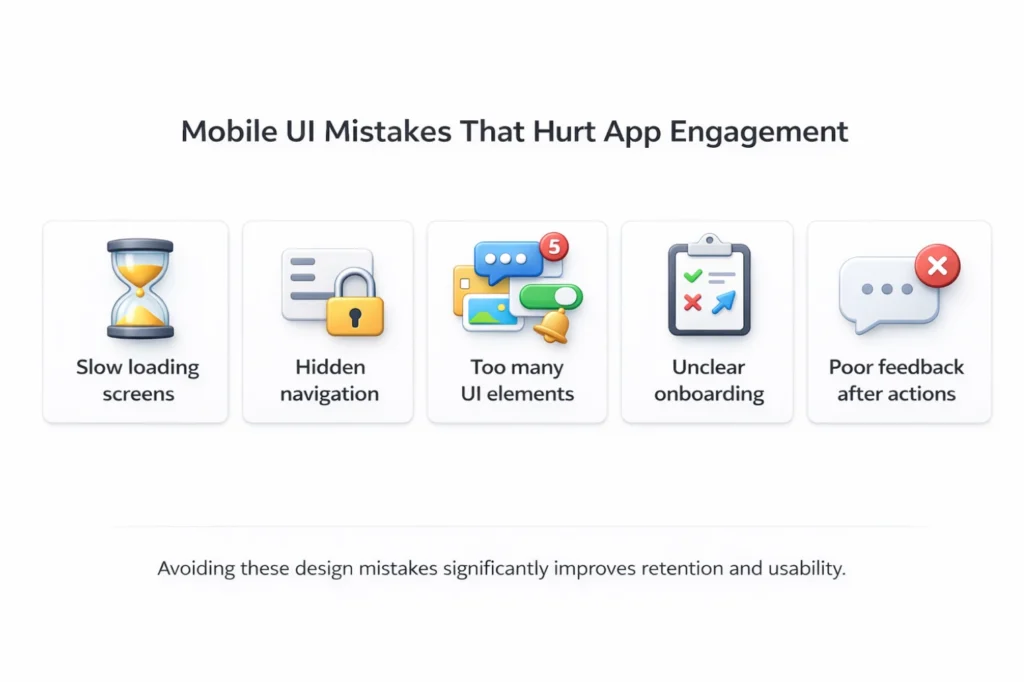
UI/UX Design Tips for Faster Mobile Interaction Feedback
When users tap, swipe or submit, they expect feedback immediately. Micro-feedback including small animations, button state changes, and loading indicators communicates that input has been received and the system is processing. Well-designed loading states reduce perceived waiting time and make the app feel more responsive. In addition, progress indicators help users feel more in control during longer actions. And these little details really impact the actual perception of how responsive and reliable an app feels.
Mobile App UI/UX Design Tips for Startup Mobile Apps
When building mobile products, startups operate under a unique set of constraints. For example, they often work with tight budgets, small teams, short timelines, and high stakes. However, design quality should remain strong without becoming a bottleneck to product learning and iteration. Mobile App Development for Startups is a different ball game when you compare with mobile app development for any enterprise product. Understanding the benefits of hiring a mobile app development company with startup experience means getting a team that knows how to move quickly without accumulating design debt.
Balancing Speed and Design Quality
You are not trying hitting it out of the park for the final version. Instead, the goal is to release a product that is usable enough to test assumptions, gather feedback, and iterate quickly. This is because iterative design, where ideas are shipped, measured, and improved over time, produces better results than long design phases. As a result, teams avoid delays in learning and ensure the product stays aligned with real user needs. Some practical compromises may be the use of design systems and component libraries to accelerate UI work, falling back to established patterns rather than building unique interactions, and optimizing for consistency across screens instead of visual novelty.
UI UX Mobile App Digital Transformation and Acquisition
When organizations are not just updating software but instead using mobile products to transform internal operations or customer-facing services, they are doing way more than a software upgrade. They are reworking work processes. Mobile apps digital transformation efforts succeed when UX is central to the strategy. In other words, the app must make workflows faster, decisions clearer, and data more accessible.
Our mobile app development company in India experience spans enterprise clients and growth-stage companies alike, helping both use mobile UX as a competitive lever.
How to Design Mobile Products to Fit Into Business Workflows
You may also like: UX Challenges in Enterprise and B2B mobile apps Dashboards required surfacing the right data without inundating users. For business-focused mobile products, dashboards should surface the right data without overwhelming users. In addition, productivity interfaces should remain frictionless for repetitive tasks. Approval flows, data entry, and reporting tools need to function effectively. For example, they must work reliably in low-connectivity environments and across different device sizes. Traditional approach, Traditional design for business workflows, Traditional design for business workflows requires deep understanding of how the work actually happens (not how everything is supposed to happen) and who actually needs to use the final product.
Mobileisation of Modern UI UX practices been applied on web
Mobile design matters to inform from web experience but the translation is not immediate, left to number of reasons. All of the stuff that follows from responsive design thinking, content hierarchy, and accessibility standards translate nicely. But the ways people interact with apps, the real estate available on screens, and how people input data, varies wildly from one platform to the next. Modern Website UI UX Practices and custom website design methodologies can help with mobile work, especially for teams migrating from web-first product habitation.
A Consistent Look on All Web and Mobile Products
If a brand users encounter across web and mobile provides different experiences, users expect more from them. To maintain trust, visual language, terminology, and interaction patterns should stay consistent across web and mobile surfaces. This is possible thanks to a component-based design system, which allows to not force the same layout on all platforms. Responsive web development approaches and mobile design principles can indeed reside within one system that changes based on context but remains consistent.
Mobile App UI/UX Design Tips and Trends Product Teams Should Watch
Here are some of the most popular design directions in mobile products. Personalization, for example, is no longer a premium feature but an established baseline expectation, where the interface is based on user behavior and preferences. Relevance is getting better whilst complexity is decreasing due to contextual interfaces that change depending on time, location or task. We’ve begun using immersive interaction patterns like gesture-driven navigation and spatial audio cueing that are driving engagement to a whole new level. Keeping up with mobile app development trends enables product teams to be ahead of the curve in terms of user expectations.
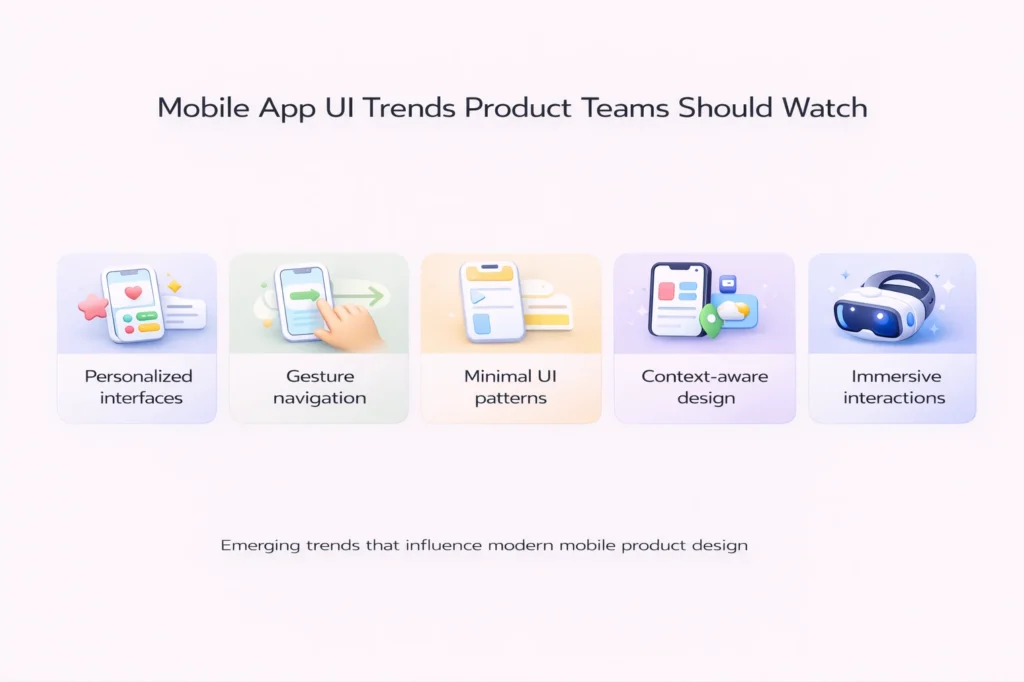
Product Strategy by the Influence of design trends
When it comes to adopting a trend, the very first question should not be visual in nature. A design pattern that looks great in a case study may not serve your users’ real-world tasks. Assess it in terms of real-world user scenarios before incorporating any new pattern. First, check whether it reduces friction. Next, evaluate whether it improves clarity. Finally, confirm that it remains usable across different screen sizes. Once trends have passed this test, they are typically worth exploring. Strike off the ones that look only good in isolation.
Selecting the Appropriate Partner to Assist with Your Mobile App Design and Development
Read The Right Development Partner Is More Than Just Technical Execution on PublicMarket. They provide product thinking, UX know-how, and the power to question assumptions when design decisions are going to lead to downstream issues. Therefore, it is worth evaluating options when considering how to choose a mobile app development company. Custom mobile app development goes beyond the technology stack and requires a team that understands the bigger picture, including both the business context and the user perspective.

Questions You Should Ask Before Hiring
Look beyond the portfolio samples while evaluating a development partner. User research is crucial, so ask them how they do it. How Are Design Decisions Captured And Leveraged To Facilitate Developer Understanding? Inquire how they deal with any change of designs during the development stage (if you have an arranged development). Inquire to see what their process looks like when first principles assumptions fail. Well-thought-out, experience-mediated answers to each of those questions on the part of a partner is the kind of product thinking that yields better outcomes. The end result is more than just an app delivered, but rather a working product for those using it.
FAQs
1. What are mobile app UI/UX design tips for beginners?
Basic principles include simple navigation, readable typography, consistent layouts, and thumb friendly interaction areas.
2. Why is UI UX important for mobile apps?
Good design improves retention, onboarding success, and overall user satisfaction.
3. What is the difference between UI and UX in mobile apps?
UI focuses on visual interface elements while UX focuses on usability, user flow, and task completion.