

Key takeaways
- Modern website UI UX practices focus on user psychology, clarity, and reduced cognitive load to improve trust and conversions.
- Performance metrics like loading speed, layout stability, and responsiveness directly influence user behavior and search rankings.
- Accessibility, mobile first design, and consistent design systems are no longer optional and impact long term business growth.
- Successful UI UX strategy combines content structure, interaction design, and technical decisions to create measurable ROI.
A website interface is no longer only a digital brochure. It is a useful business tool that has a direct effect on sales, customer trust, and how well the business runs. When a potential client visits your page, they are not only looking at colors and fonts. They are judging how trustworthy you are in a matter of seconds.
Bad choices about the interface cost money. Users will leave if they can’t find what they need right away. Search engines see this bounce rate as a sign that your site isn’t valuable, which damages your organic ranking. On the other hand, a purposeful approach to design takes the user on a path that seems natural and unavoidable. This is where modern website UI and UX practices make the difference between a site that doesn’t change and one that gets a lot of conversions.
The CodeNeptune way of doing UI UX focuses on the point where looks and performance meet. You can’t only look good. The site needs to be useful for both the user and the corporate purpose behind it.
Why Modern Website UI UX Practices Matter for Business Websites
Design has changed from an art form to a science of behavior. In the past, businesses tried to make their pages stand out with bright visuals. The goal today is to make things easier.
When you pay for a custom website design, you’re really paying for trust. People think that clear information is a sign of expertise. Users think your business procedures are just as messy if your navigation is hard to understand or your layout is cluttered.
Buyers immediately decide if something is true. Research shows that you have fewer than three seconds to get a visitor to stay. Modern website UI UX practices prioritize this initial interaction to ensure the user feels secure and understood immediately.
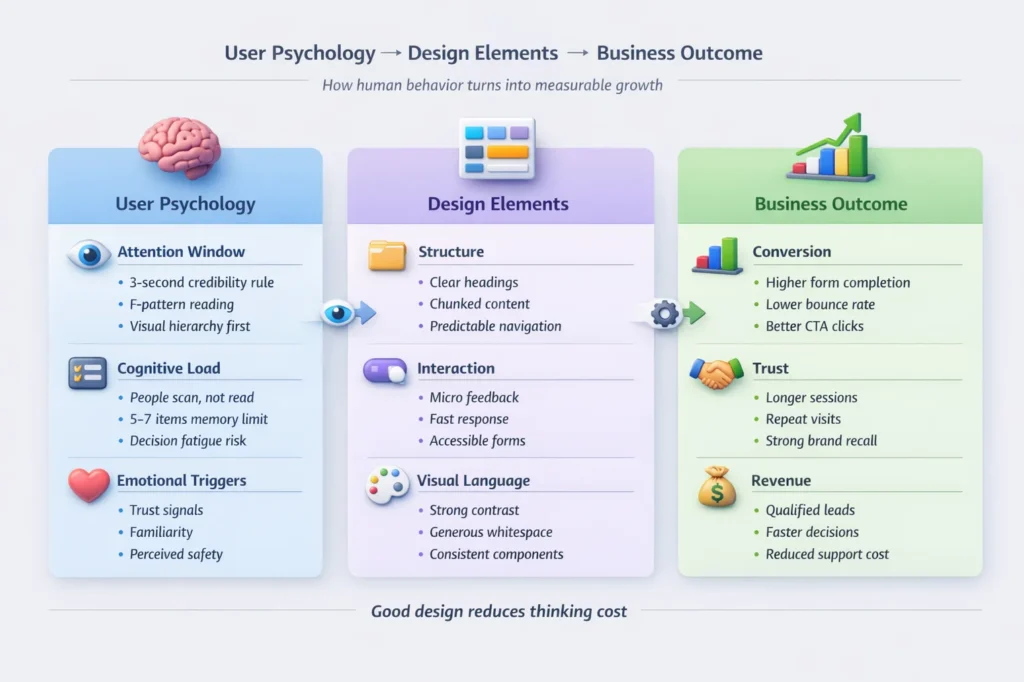
User Psychology Behind Modern UI and UX Decisions
You make a choice with every click. It’s your responsibility to make such choices easy.
- Cognitive load: This is how much mental effort it takes to use the interface. Good design makes this less likely.
- Patterns of attention: Users look in F-patterns or Z-patterns. Strategic layouts put important information in these lines of sight.
- Emotional triggers: Colors and spacing may make you feel things. A small site makes you feel rushed or cheap, while an expansive location makes you feel tranquil and luxurious.
Core Modern Website UI UX Practices Every Business Should Follow
The best companies don’t guess. They utilize proof. Businesses can use data to make smart layout choices by working with user experience design services.
Analytics, not views, are what evidence-based design is based on. If statistics shows that people leave a certain form field, modern website UI UX practices dictate that you remove or simplify that field.
Accessibility is also a big reason. It’s not something you think about later. Making things easier to read on a screen and navigate with a keyboard makes the structure better for everyone.
Making things easy to use as a business strategy
Following the Web Content Accessibility Guidelines (WCAG) will help you reach more customers. People with impairments can become clients if navigating is easy for everyone. Also, features like dark mode are now expected to be common. Not paying attention to these preferences can make a lot of people in your audience feel left out.
Performance Focused UI UX Practices for Faster Websites
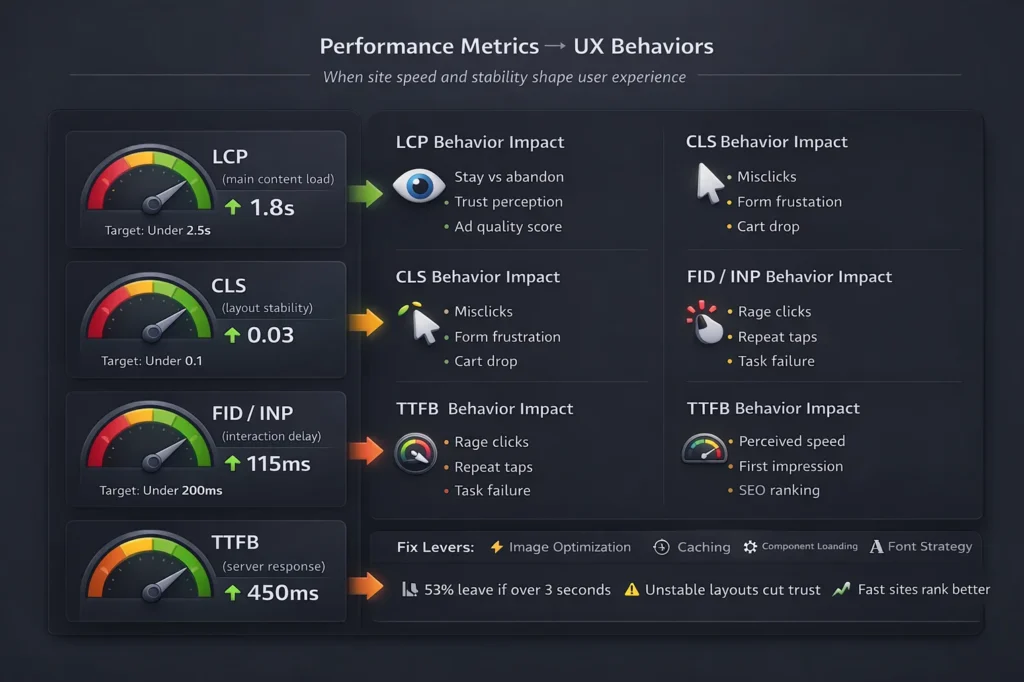
A site that is slow is broken. You can have the most beautiful visuals in the world, but they won’t help you if they don’t load. Modern website UI UX practices treat speed as a design element.
Google uses website loading speed as a ranking element, and people use it as a trust factor. Core Web Vitals do this by looking at how well a page loads, how interactive it is, and how stable it is visually.
Changes in layout are especially bad. When a user tries to click a button and it moves, they get quite angry. Techniques that make things seem faster, including employing skeleton displays that show a basic layout while content loads, keep consumers interested while they wait.
Role of Hosting and Infrastructure
The server your design is on is just as important as the design itself. With reliable cloud-based website hosting, your complex UI will let servers respond quickly.
Caching methods and Content Delivery Networks (CDNs) send your assets all over the world. This means that a person in London has the same quick experience as a person in New York. Infrastructure is the base of strong UX that you can’t see.
Mobile First UI UX Practices for Responsive Digital Experiences
Designing for desktops is typically second. A phone is where most people will see your brand. Responsive website development is the bare minimum, but interaction standards go far beyond.
Touch targets should be big enough for fingers to touch, not simply mouse pointers. You can use thumb zones to decide where to put important navigation components. The bottom of the screen is the best place for mobile users, but the upper corners are hard to get to.
When Mobile UX Doesn’t Work
When you look at mobile app development services, you can notice that they follow the rules for each platform quite closely. Web design needs to be this disciplined.
Forms are a popular place when things go wrong. Getting too much information on a short screen stops people from converting. Another problem is the depth of navigation. The architecture is too deep if a user has to tap four times to get to a service page. Micro-interactions, like a small animation after a task is done, give the user the feedback they need to stay on track.
Design Systems and Scalable UI UX Practices Used by Leading Brands
Trust comes from being consistent. The user gets lost if every page appears a little different. Before developing the site, an ui ux design company for tech companies will usually make a design system.
Developers can utilize component libraries to reuse things like cards, buttons, and headers. This makes sure that everything is the same at a large scale. Token-based design keeps design choices, such as hex codes and spacing units, in one place. When you turn your brand blue, it changes everywhere right away.
SaaS Interface Expectations in Modern UX Design
There are some problems that are particular to Software as a Service (SaaS) systems. The main focus of ui ux design services for saas is on dashboards and how to show data.
This is where onboarding is so important. People who are new to the tool should be able to grasp how useful it is right away, without having to read a manual. Feedback from the state is also very important. Users need to know if the system is saving, loading, or working. A motionless screen throughout a process makes people nervous.
Navigation and Information Architecture in Modern Website UI UX
The way your information is set up decides if people can find what they need. A robust website development process begins with information hierarchy, not code.
Menu psychology says that people recall the first and last things in a list the best. People are also changing how they search. People want search bars that offer results as they type.
Scroll Based Storytelling in Website UX
Long scrolling pages work well if they tell a story. Layouts that tell a story lead the user through an issue, a solution, and a proof point.
Visual rhythm keeps the eye busy. Switching between words and pictures keeps you from becoming tired. The location of the Call to Action (CTA) should match these story beats. You ask for the sale once you’ve shown them how valuable it is.
Technology Choices That Influence Modern UI UX Practices
The coding that runs your site changes how it feels. Modern web development frameworks like Vue and Angular let you make dynamic interfaces that don’t need to be reloaded every time you do something.
Clean code is important for front-end performance. Sometimes, CMS limits can get in the way of creativity, therefore picking the correct technology stack is a design choice. You need to find a balance between being flexible and being fast.
Guide to Choosing a Platform
Choosing between a library like React vs WordPress for business website builds depends on your goals. React gives you a smooth, app-like experience that works well for complicated interactions. Marketing teams may manage their content more easily with WordPress.
The effect of maintenance is equally real. A marketing coordinator might be able to handle a regular CMS, but a dedicated developer is needed for a complicated bespoke stack.
Experience with Custom vs. Template
There is a distinct difference in the final product when comparing a Custom website development vs template-based services comparison.
Templates are not flexible. They put your stuff in a box that was already prepared. Custom design gives you freedom. It lets you create features that are made to fix your customers’ problems.
Long-term costs frequently favor custom. Templates might get too big and hard to change, which can mean having to rebuild everything sooner than you thought. If your site seems similar a lot of others, you can’t set your brand apart.
Triggers for Redesign
How can you tell when it’s time? A website redesign is necessary when your metrics stagnate.
Some signs that anything is wrong are high bounce rates, little time on page, or sales teams complaining that the site doesn’t show the current product. There are dangers to moving, like losing your SEO rank, but the risk of staying with an old site is generally bigger.
UI and UX best practices for e-commerce
Selling online requires a specific set of modern website UI UX practices. Ecommerce website development centers on reducing purchase anxiety.
The psychology of checkout is interesting. If users find unexpected expenses or have to make an account, they will leave their carts. For conversion, guest checkout is required. It should be easy to find products, and the filters should make sense for the inventory.
Elements of Conversion
You need to be able to see trust signals. The “Buy” button needs to be next to security badges, refund policies, and contact information.
Reviews and photographs made by users are examples of social proof that back up the choice. Microcopy, which is the small language on buttons and forms, can help make things clearer. Changing “Submit” to “Get My Free Quote” can affect how many people click through.

Picking the Right Partner
Choosing a vendor is a strategic choice. You need a partner who knows more than simply coding. It can assist to look over a checklist on how to choose a website development company.
Check for openness in the process. You need to know what’s going on at every step. Post-launch support is also very important because software needs to be kept up to date.
Choices by Region
Talent is everywhere. You could identify a Chennai-based web design company that does high-end business work. Many companies use website designers in Chennai since they are very accurate and cost-effective.
A good website development company in India generally works with clients from all over the world, which helps them apply worldwide standards to their local work.
Plan for Implementation
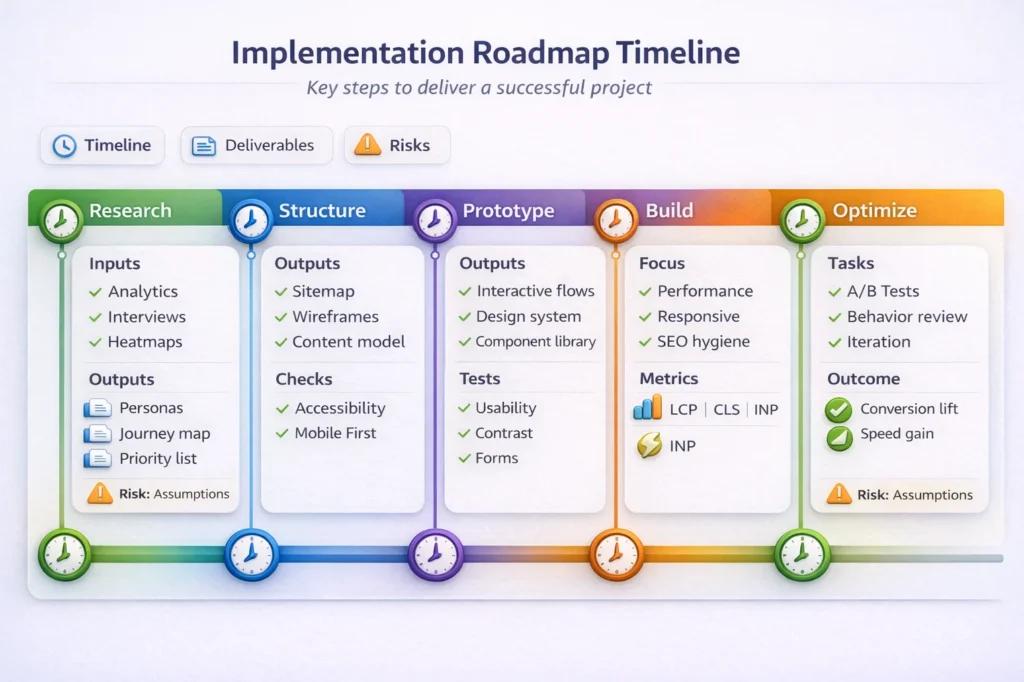
A plan is what makes a project successful. Custom website development usually follows a waterfall or agile methodology
- Research: Getting to know the user.
- Wireframes: Making a plan for the construction.
- Prototype: Testing the flow.
- Testing: Finding the problems.
- Launch: Going live.
Stack of Tools
Using the correct tools makes things go faster. The best tools for responsive web design include Figma for interface design, BrowserStack is the best tool for testing across devices, and Lighthouse is the best tool for checking performance.
Risks and Management
A website will decay without governance. A website development company can help establish rules for maintenance.
Accessibility risk is the same as legal risk. You could be sued if your site doesn’t follow the rules. When you add too many plugins without optimizing them, you get performance debt. When new pages are added without checking the style guide, this is called design inconsistency.
Cost and ROI Framework
It costs money to make things well, but it costs more to make them badly. When looking at the Top Web Development Firms, don’t simply look at the lowest bid. Look at the range of investments they offer.
Increased conversion, greater average order value, and fewer support requests are all examples of value metrics. It’s also crucial to know what’s actual on the timeline. It takes time to do a good job. Most of the time, rushing a UX project means making mistakes that need to be fixed later.
Conclusion and Next Steps
Implementing modern website UI UX practices is an ongoing process of improvement. It requires a willingness to look at data and adapt.
To continue forward, you should check your current site for problems that are causing problems. Make sure to give performance updates top priority to keep things fast. Finally, make a design system that keeps things the same as you grow.
Frequently Asked Questions
1. What is the difference between designing a user interface (UI) and a user experience (UX)?
User Interface (UI) is all about the design and arrangement of things like screens, buttons, and other visual elements. User Experience (UX) looks at the whole journey, how the user feels, and how easy it is for them to reach their goals.
2. What are the most important web vitals for UX?
These are Google’s own measurements of speed, responsiveness, and visual stability. They are very important signs of how well your user experience is.
3. How long does it take to redesign?
Depending on how complicated it is, how much content needs to be made, and how long it takes to get permission, a full redesign of a business website usually takes 12 to 16 weeks.