Key Takeaways
- The best AI email assistants help businesses reduce inbox overload and improve communication efficiency.
- Different tools excel in different areas, including shared inbox management, sales follow-ups, and workflow automation.
- Microsoft Copilot and Google Gemini are strong choices for organizations already using their respective ecosystems.
- Teams should evaluate security, collaboration features, integrations, and scalability before selecting an email assistant.
- Choosing the right solution depends on your primary business challenge rather than the number of available features.
Managing email has become harder as teams juggle customer conversations, internal updates, sales follow-ups, and project communication across multiple platforms. The best AI email assistants help professionals organize inboxes, prioritize messages, draft responses, and cut the time spent on repetitive tasks.
Additionally, organizations want smarter ways to improve communication workflows without piling on operational complexity. Based on our experience working with intelligent workflow solutions, choosing the right email assistant comes down to factors like ecosystem compatibility, collaboration requirements, automation depth, and security needs.
To help you make an informed decision, this guide reviews the best AI email assistants available today, compares their strengths, highlights pricing considerations, and helps your business pick the most suitable option.
What Makes the Best AI Email Assistants Worth Using?
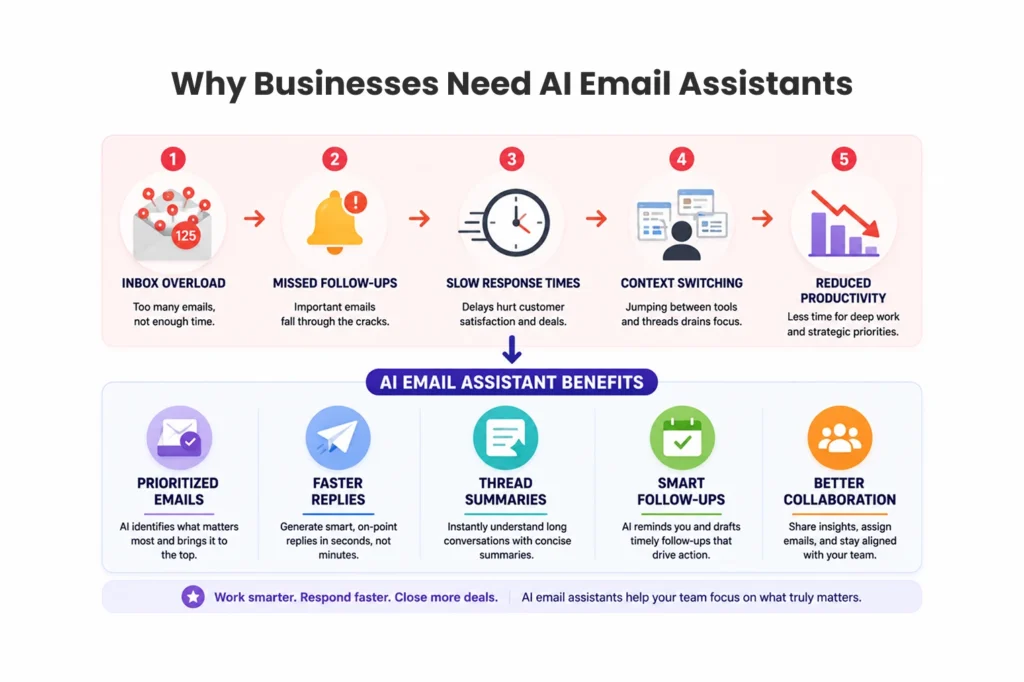
What Email Challenges Do Businesses Face Today?
Today, most professionals spend a surprising amount of time sorting messages, scheduling follow-ups, and digging through old threads for context. According to a 2019 McKinsey analysis, workers spend around 28% of their week on email. As a result, the lost time can quickly add up across an entire team.
As a result, the best AI email assistants tackle these problems by helping users:
- Prioritize important messages
- Draft replies faster
- Summarize lengthy threads
- Organize inbox workflows
- Reduce manual follow-ups
If you want a broader view of what’s available, explore our roundup of the best AI tools to see how email assistants fit into a larger productivity stack.
Which Features Should You Evaluate Before Choosing One?
Before making a decision, weigh the following criteria carefully:
- Inbox prioritization: Does it surface what matters first?
- Email drafting quality: Are the generated replies usable with minimal edits?
- Calendar integration: Can it schedule and coordinate meetings?
- Collaboration capabilities: Does it support shared inboxes and team notes?
- Security certifications: Are SOC 2, GDPR, or similar controls in place?
- Workflow customization: Can you build rules and conditional actions?
- CRM connectivity: Does it sync with your sales tools?
Furthermore, teams that need deeper automation tailored to their stack, partnering with an AI agent development company can extend an off-the-shelf assistant into a fully custom workflow.
Best AI Email Assistants Compared
Is Read AI the Best Choice for Cross-Platform Teams?
For example, Read AI stands out through contextual intelligence across meetings, chats, and email. It connects what happens in a call to what gets written afterward, which helps enterprise teams keep conversations aligned.
Best for: Cross-platform collaboration, meeting-to-email workflows, and enterprise teams.
Strengths
- Multi-platform visibility
- Strong compliance features
- Context-aware recommendations
Limitations
- Advanced features may require onboarding
- Less suitable for users who only want simple email drafting
What Makes Lindy Good for Workflow Automation?
In contrast, Lindy focuses on workflow orchestration and customizable actions. More importantly, instead of just drafting replies, Lindy can trigger multi-step processes based on conditions you define.
Best for: Process-driven teams, workflow automation, and operations management.
Strengths
- Custom workflows
- Conditional actions
- Extensive integrations
Limitations
- Higher learning curve
- Premium pricing
Teams that want to push automation further should look into agentic AI development services, which can layer autonomous decision-making on top of tools like Lindy.
Best AI Email Assistants for High-Volume Inbox Management
Why Do Power Users Prefer Superhuman?
Meanwhile, Superhuman is built for professionals who process hundreds of emails daily. In particular, Its speed-first design and keyboard shortcuts turn inbox triage into a fast, almost frictionless routine.
Best for: Executives, sales professionals, and founders.
Advantages
- Fast interface
- Efficient keyboard shortcuts
- Powerful inbox triage
Trade-offs
- Premium pricing
- Optimized for power users rather than casual senders
How Does Spark Mail Handle Multiple Accounts?
Similarly, Spark Mail brings several email accounts into one unified workspace. At the same time, it’s a strong fit for people who switch between personal, client, and business inboxes throughout the day.
Best for: Freelancers, consultants, and small business owners.
Advantages
- Smart categorization
- Shared drafts
- Cross-device synchronization
Trade-offs
- Advanced capabilities vary by plan
Curious how these assistants differ from older support tools? Our comparison of AI chatbots vs traditional chatbots breaks down where rule-based systems end and intelligent assistants begin.
Best AI Email Assistants for Microsoft and Google Users
Should Microsoft Users Choose Copilot?
Specifically, for organizations already invested in Microsoft tools, Microsoft Copilot integrates directly with Outlook and the wider Microsoft 365 suite. For organizations already standardized on Microsoft, the value is hard to beat because it works inside tools employees use every day.
Best for: Enterprise organizations and Microsoft-centric environments.
Advantages
- Native Outlook integration
- Familiar user experience
- Enterprise governance controls
Limitations
- Greatest value lives inside Microsoft ecosystems
Is Google Gemini the Best Fit for Gmail Users?
On the other hand, Google Gemini brings intelligent assistance straight into Gmail and Workspace. Adoption is easy because the help appears right where users already write, reply, and search.
Best for: Google Workspace users and small to mid-sized businesses.
Advantages
- Seamless Gmail experience
- Easy adoption
- Competitive pricing
Limitations
- Primarily focused on Google environments
Meanwhile, to connect these assistants with lead pipelines, many teams build custom flows through n8n lead generation workflow development that route emails into automated sequences.
Best AI Email Assistants for Teams and Shared Inboxes
How Does Hiver Improve Shared Inbox Collaboration?
Likewise, Hiver turns Gmail into a collaborative workspace for support and operations teams. It adds assignment, tracking, and accountability to inboxes that multiple people manage at once.
Best for: Customer service teams, shared inbox management, and internal support functions.
Strengths
- Team assignment workflows
- Shared visibility
- Customer communication management
Which Collaboration Features Matter Most for Teams?
When evaluating team-focused solutions among the best AI email assistants, prioritize:
- Ownership assignment
- Internal notes
- SLA monitoring
- Reporting dashboards
- Shared inbox analytics
If voice channels are part of your support mix, consider how email tools pair with AI voice assistant app development for a fuller customer communication picture.
Best AI Email Assistants for Sales Professionals and Founders
What Makes Skarbe Useful for Sales Teams?
For sales-focused teams, Skarbe combines email productivity with lightweight deal tracking. Moreover, It helps founders and small sales teams stay on top of follow-ups without the overhead of a full CRM.
Best for: Founders, startup teams, and sales-focused professionals.
Advantages
- Follow-up tracking
- Meeting coordination
- Relationship management
Limitations
- Less suitable for large enterprise operations
How Should You Choose a Sales-Focused Email Assistant?
Sales teams should prioritize features that move deals forward:
- CRM integration
- Automated reminders
- Lead tracking
- Conversation history
- Meeting scheduling
For broader automation across your tech stack, our guide to the best cloud automation tools shows how email assistants connect to wider sales operations.
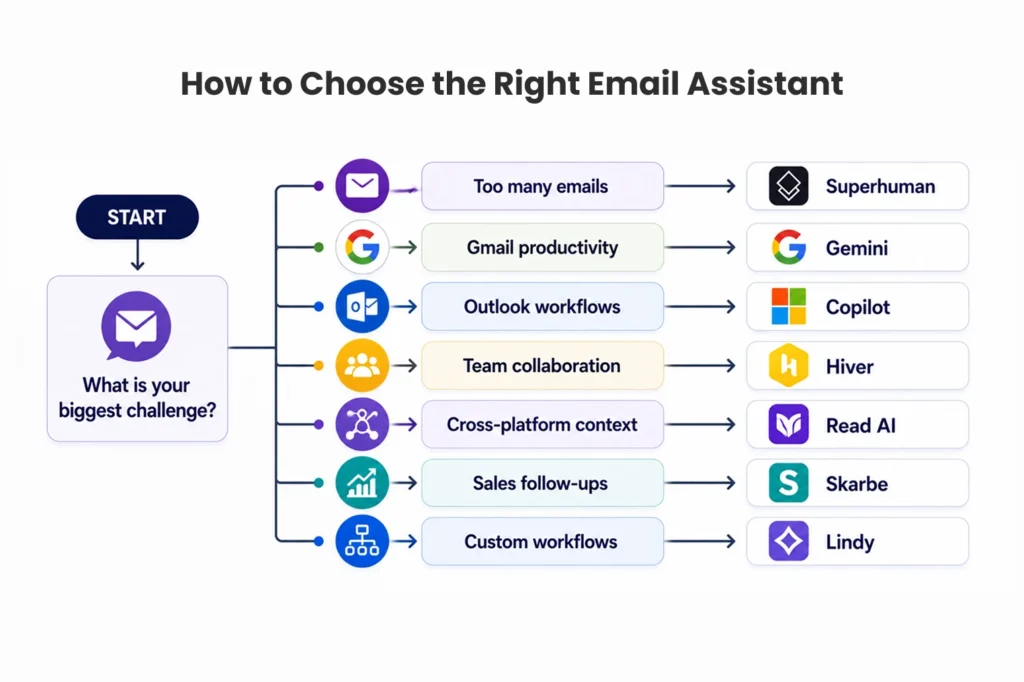
How to Choose the Best AI Email Assistants for Your Business
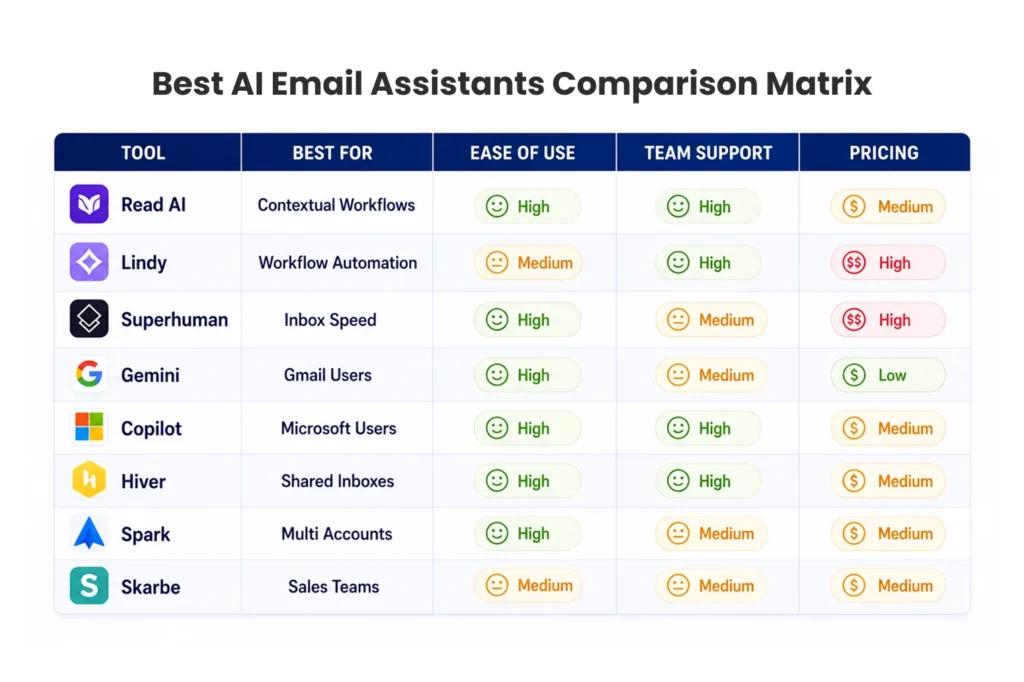
Naturally, different organizations have different priorities. The table below maps common needs to the right type of solution.
| Business Need | Recommended Solution Type |
| Faster inbox processing | Superhuman |
| Workspace integration | Gemini or Copilot |
| Shared inbox collaboration | Hiver |
| Cross-platform context | Read AI |
| Workflow customization | Lindy |
| Sales productivity | Skarbe |
Therefore, when evaluating the best AI email assistants, focus on the problem you want to solve first rather than the longest feature list. A tool that nails your core need will deliver more value than one stuffed with capabilities you never touch.
To see how intelligent tools reshape other workflows, read how AI improves website development. And if your team needs better coordination beyond email, compare options in our list of free project management software.
Pricing Comparison of Leading Email Assistants
However, pricing varies significantly across these tools, so weigh cost against measurable productivity gains.
| Tool | Typical Starting Price Range |
| Google Gemini | Lower-cost entry option |
| Microsoft Copilot | Microsoft 365 dependent |
| Hiver | Mid-range team pricing |
| Superhuman | Premium pricing |
| Lindy | Higher-end workflow pricing |
| Read AI | Tiered business plans |
| Spark Mail | Individual and team plans |
| Skarbe | Sales-focused pricing |
In addition, before you commit, compare total cost against productivity gains, implementation effort, and long-term scalability. For organizations that outgrow standard plans, custom web application development can deliver a tailored solution that fits exactly how your team works.
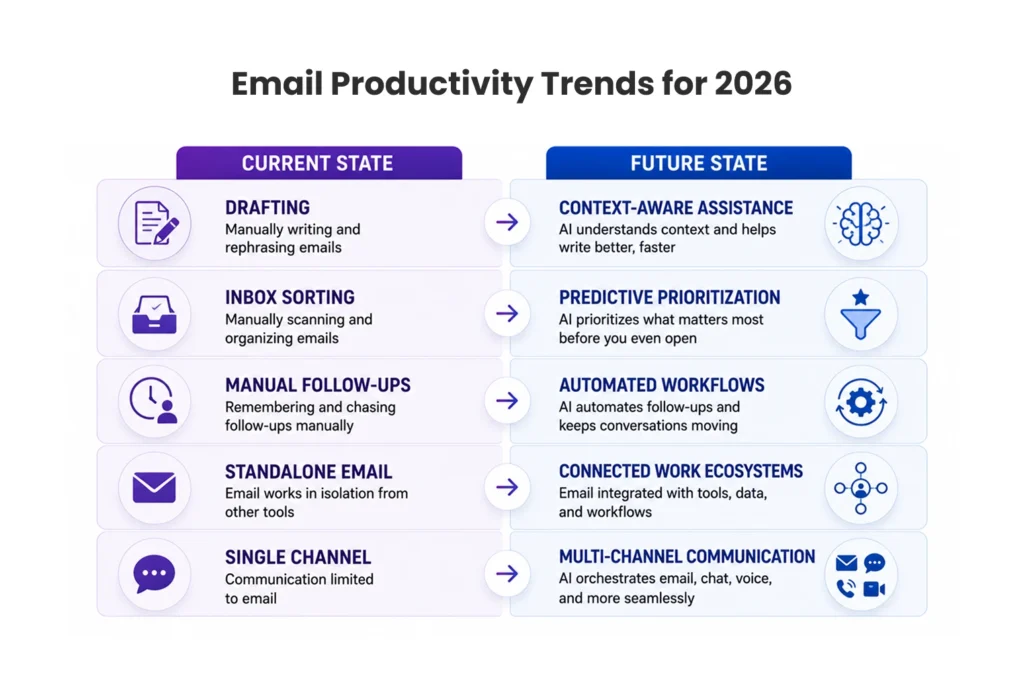
Future Trends in Email Productivity Tools
Looking ahead, the next generation of the best AI email assistants is moving well beyond drafting and organization. Tools are starting to act, not just suggest.
Key trends to watch include:
- Context-aware recommendations
- Workflow execution
- Multi-channel communication support
- Meeting and email synchronization
- Team collaboration enhancements
Consequently, Organizations increasingly want unified communication experiences rather than a patchwork of standalone inbox tools. The assistants that win will be the ones that connect email to the rest of the workday.
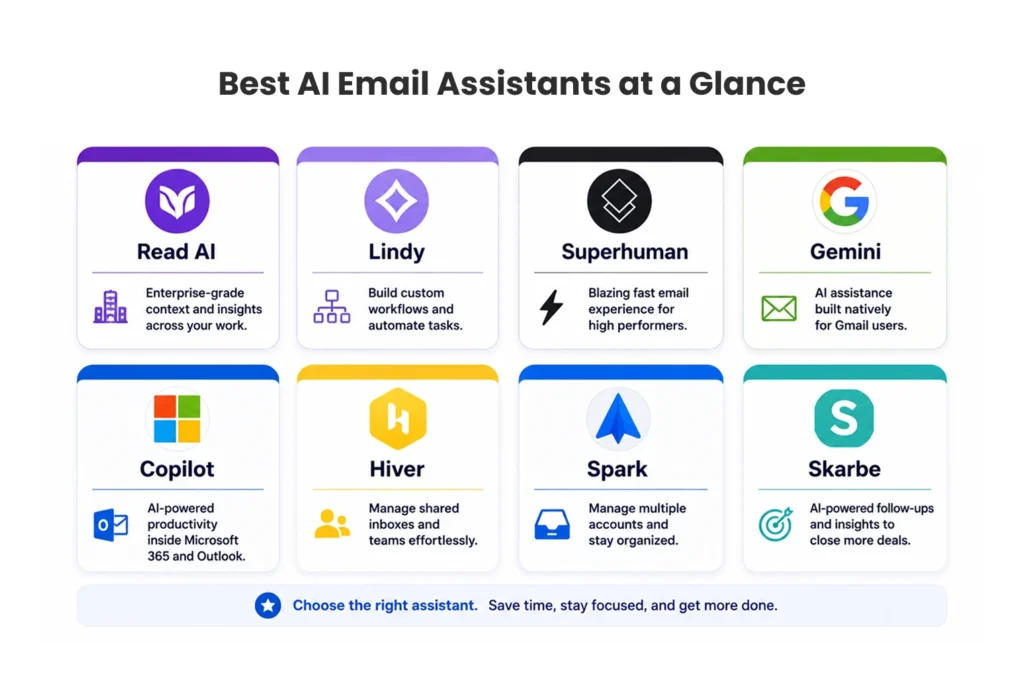
Match the Tool to Your Biggest Email Problem
Ultimately, the best AI email assistants are no longer limited to drafting messages. They help teams prioritize communication, improve collaboration, streamline workflows, and stay productive across increasingly complex business environments.

When evaluating your options, start with your primary challenge, whether that’s inbox overload, team collaboration, workflow management, or sales communication. Read AI shines for cross-platform context, Superhuman for raw inbox speed, Hiver for shared inboxes, and Skarbe for sales follow-ups. In the end, matching the solution to the need is what delivers the greatest long-term value.
FAQ About the Best AI Email Assistants
1. What are the best AI email assistants for businesses?
Popular options include Read AI, Lindy, Superhuman, Microsoft Copilot, Google Gemini, Hiver, Spark Mail, and Skarbe. The right choice depends on your workflow requirements and ecosystem preferences.
2. Are AI email assistants safe to use?
Most leading providers offer enterprise-grade security, compliance certifications, and privacy controls. Always review a provider’s security documentation before connecting business accounts.
3. Which email assistant works best with Gmail?
Google Gemini offers the most native Gmail experience. Spark Mail, Read AI, Lindy, and Hiver also support Gmail-based workflows.
4. Can AI email assistants send emails automatically?
Many platforms use approval-based workflows, so you review before anything sends. Some advanced solutions support automated actions, but settings typically let users keep control.
5. How much do AI email assistants cost?
Pricing ranges from entry-level plans under $10 per month to premium business solutions exceeding $50 per user monthly.
6. Which email assistant is best for teams?
Hiver is often preferred for shared inbox collaboration, while Read AI and Microsoft Copilot are strong choices for larger organizations.