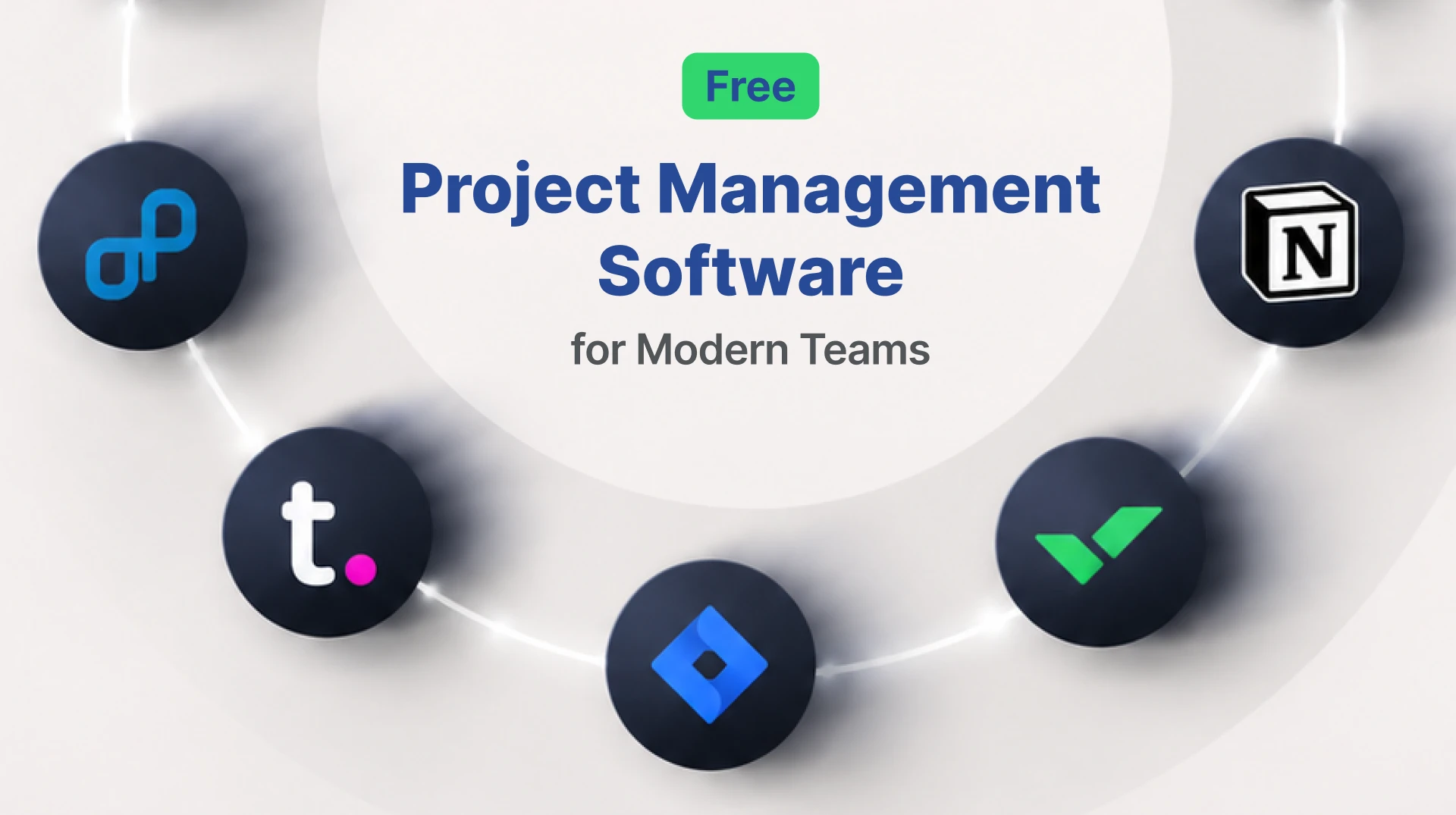
Managing tasks across growing teams becomes incredibly difficult when communication, timelines, and critical files are scattered across different platforms. Missing a single update in an email thread can throw an entire sprint off schedule. Because of this, many startups and growing businesses look for reliable free project management software to organize projects without immediately increasing their operational costs.
The challenge is rarely just finding a tool that offers a basic free plan. Teams also need flexibility, robust collaboration features, clear reporting, and genuine scalability that fit their specific daily workflows. Regardless of whether you manage a small creative agency, a fully remote startup, or a fast-paced product team, choosing the right centralized platform can instantly improve visibility and dramatically reduce delays.
At an early stage, many successful businesses focus intensely on improving workflows alongside better delivery systems, structured documentation, and scalable processes. This is exactly where discussions around Code Neptune and our development process often align with broader operational planning strategies. Finding the right software acts as the foundation for these higher-level growth initiatives.
Why Businesses Need Free Project Management Software
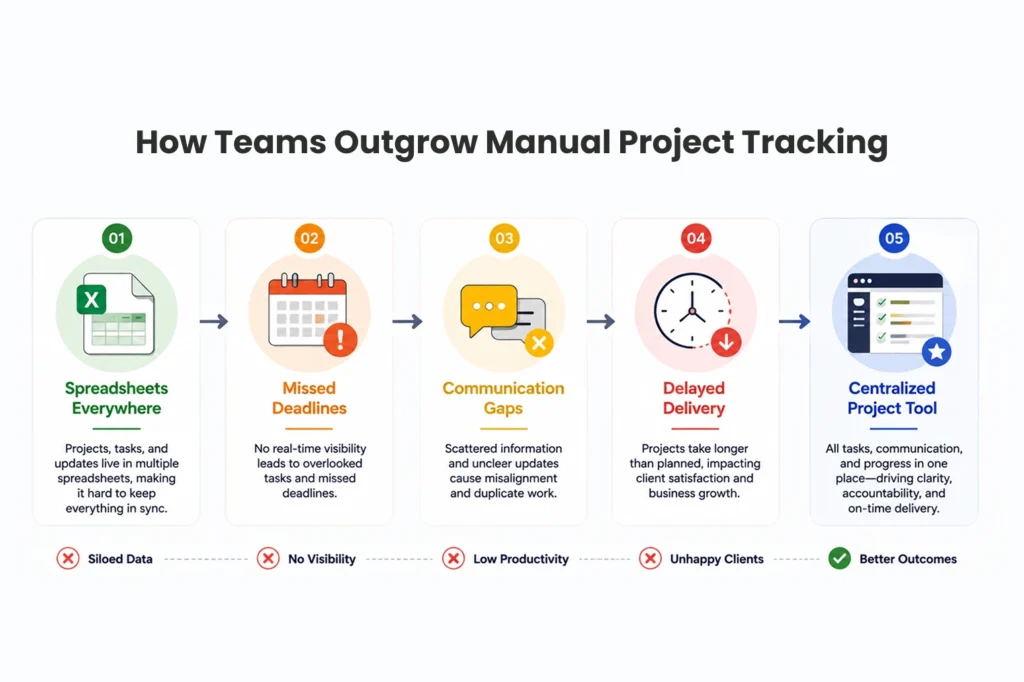
Businesses often start out by managing their daily operations with simple spreadsheets, instant chat tools, and manual follow-ups. While this works for a handful of people, over time, this fragmented approach creates massive confusion around upcoming deadlines, task ownership, and performance reporting. When no one knows who is responsible for a specific deliverable, projects inevitably stall.
Using free project management software helps teams centralize their tasks, track progress accurately, and improve cross-departmental collaboration without requiring large upfront financial investments. Instead of digging through chat histories to find a brief, team members can access everything they need in one dedicated workspace.
Common Challenges Teams Face
Without a unified system in place, organizations run into several recurring operational roadblocks. Missed deadlines occur frequently due to scattered communication and unclear expectations. Managers struggle with limited visibility into overall project status, making it difficult to allocate resources effectively. Furthermore, companies face difficulty managing remote contributors who need asynchronous access to project details. Poor file organization and repetitive manual tracking processes drain hours of productive time every single week.
Teams working on scalable digital products must overcome these hurdles quickly. They frequently combine centralized tracking systems with tools related to custom web application development and operational workflows to improve execution efficiency. Tracking a software build requires precise coordination between designers, developers, and quality assurance testers.
For organizations managing infrastructure-heavy deployments, integrating these daily workflows with expert devops consulting services can further streamline collaboration between development and operations teams. A clear project management tool serves as the bridge connecting these highly technical disciplines.
Best Free Project Management Software Compared
Different tools serve completely different business needs. Some platforms focus heavily on visual flexibility, while others prioritize deep technical documentation or strict Agile workflows. Reviewing the strengths of each option helps leaders make an informed decision.
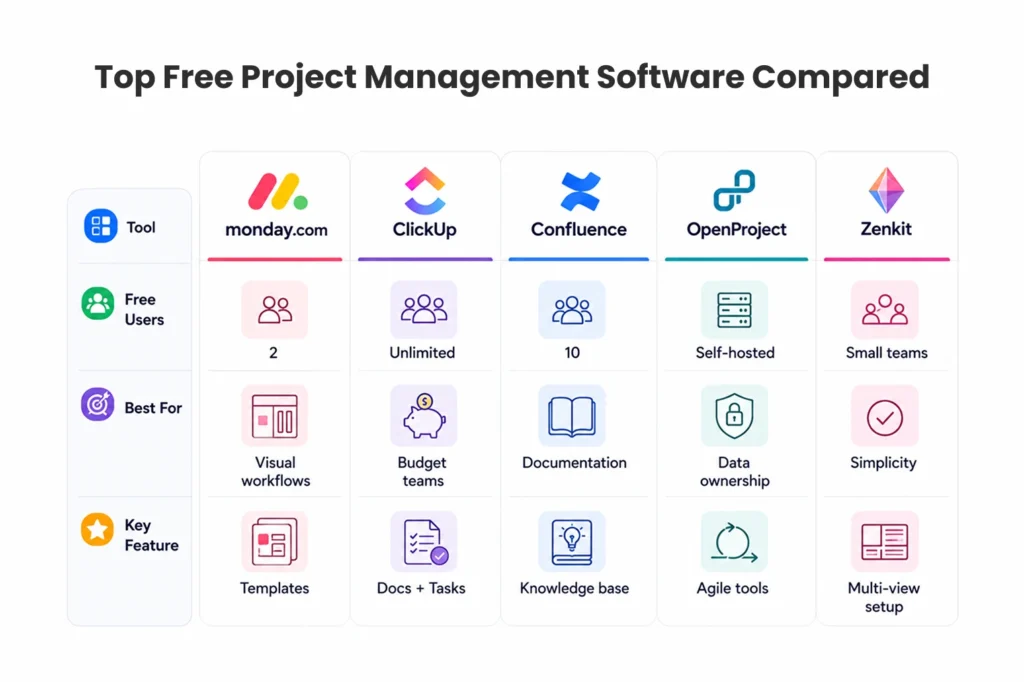
monday.com
monday.com offers a highly visual, clean interface packed with customizable templates and easy-to-read Kanban boards. Recently, the platform has integrated advanced AI agents that work side by side with human teams to automate tasks, generate status reports, and summarize meeting transcripts.
Best for: Small teams needing visual workflow management alongside modern AI assistance.
Free plan: Up to 2 users.
Strengths: Beautiful templates, custom forms, insightful dashboards, and incredibly easy onboarding.
It works exceptionally well for marketing teams, creative agencies, and lightweight operational planning. Teams can easily assign tasks, label priorities with color-coded tags, and track progress at a glance.
ClickUp
ClickUp frequently ranks as one of the most flexible and feature-rich options available in the free project management software category. It aims to replace multiple apps by bringing documents, chat, and task management into a single interface.
Best for: Budget-conscious growing teams that need extensive customization.
Free plan: Unlimited users (with some feature limitations).
Strengths: Native docs, sprint management, robust task automation, and varied collaboration tools.
Many expanding startups pair platforms like ClickUp with comprehensive operational stacks involving enterprise devops consulting to vastly improve cross-functional visibility. The ability to customize exact workflows makes it a favorite among technical and non-technical departments alike.
Confluence
Confluence takes a different approach by focusing heavily on documentation, knowledge sharing, and long-form collaboration. Created by Atlassian, it acts as a central wiki where teams can draft requirements, meeting notes, and technical specifications.
Best for: Internal documentation management and organizational knowledge bases.
Free plan: Up to 10 users.
Strengths: Powerful wikis, structured documentation spaces, and deep integration with Jira.
This platform is especially useful for teams working on documentation-heavy software products alongside dedicated ui ux design services for saas. Keeping design guidelines, user research, and technical constraints in one searchable location prevents costly miscommunications.
OpenProject
OpenProject stands out as a powerful open-source alternative built specifically for organizations that want maximum control over their data and infrastructure. It provides traditional project management features tailored for highly structured environments.
Best for: Self-hosted project management and strict data privacy requirements.
Free option: Community Edition (self-hosted).
Strengths: Advanced Agile tools, precise budgeting features, robust bug tracking, and native time tracking.
Companies prioritizing total data ownership and deep customization often evaluate this option in tandem with broader infrastructure planning and the best cloud automation tools available. Hosting your own project management system ensures that sensitive company data never leaves your private servers.
Zenkit
Zenkit offers a much simpler learning curve for small teams that find enterprise tools overwhelming. It strips away unnecessary complexity while still providing essential views like lists, calendars, and mind maps.
Best for: Lightweight project collaboration and rapid task organization.
Free plan: Small teams and individual users.
Strengths: Multiple intuitive project views, recurring task management, and helpful automation support.
Businesses exploring operational simplification also look into low code app development to further reduce manual process overhead. Tools like Zenkit perfectly complement these agile, low-barrier philosophies by keeping the barrier to entry extremely low for new employees.
How to Choose the Right Free Project Management Software
Not every platform fits every team. Making the right selection should depend directly on your specific workflows, your current team size, your specific reporting needs, and your future scalability requirements. A tool that looks great on paper might frustrate your team if it does not match how they naturally work.
Evaluate Collaboration Features
Effective software must allow team members to communicate without friction. Look for tools that support real-time commenting directly on tasks, preventing conversations from migrating back to confusing email chains. File sharing capabilities keep essential documents tied to their specific deliverables. Timeline visibility helps managers foresee bottlenecks before they happen. Furthermore, task dependencies ensure that team members know exactly what needs to be completed before they can begin their own work. Finally, role-based permissions protect sensitive information while still allowing broad collaboration.
If the chosen platform lacks collaboration flexibility, growing teams may outgrow it quickly and revert back to their old, inefficient habits.
Consider Long-Term Scalability
A free plan may work beautifully during your initial launch, but businesses should carefully assess what happens when they inevitably grow. Evaluate the storage limitations, as creative teams can quickly burn through basic data caps. Check user restrictions to understand how adding new hires will impact your costs. Look deeply into the reporting capabilities available on the free tier, as management will soon demand data on team performance. Consider the integration ecosystem to ensure the tool connects with your existing software stack. Finally, review the upgrade pricing so you are not caught off guard when you eventually need premium features.
Teams managing rapidly growing digital ecosystems frequently combine these foundational workflow systems with broader operational stacks and advanced web development tools. Planning for this integration early saves significant migration headaches later.
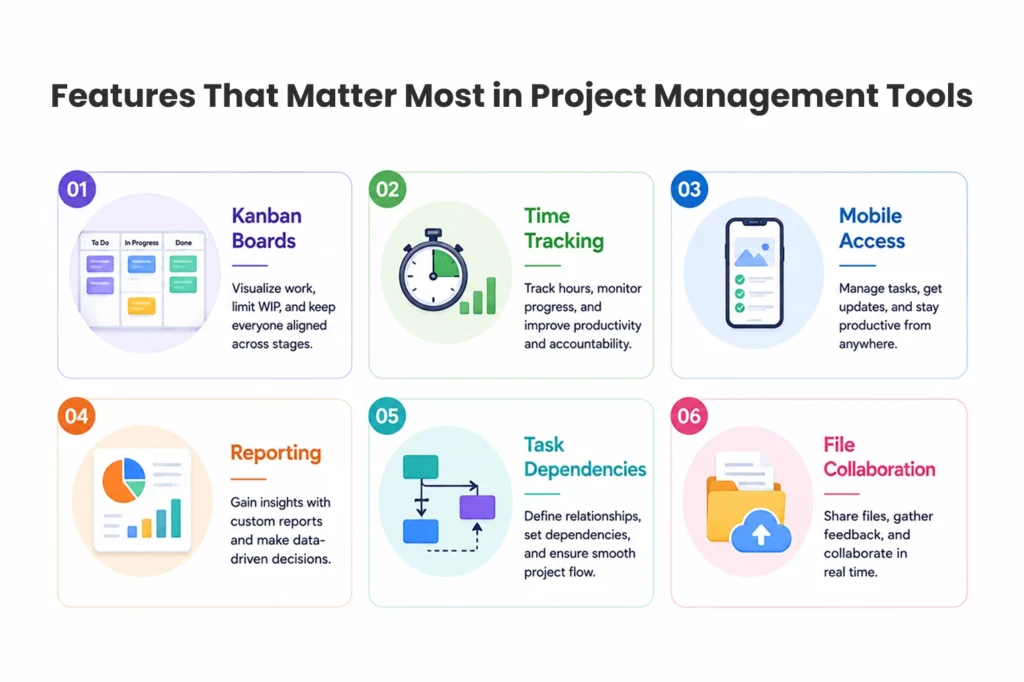
Key Features to Look for in Free Project Management Software
The most successful platforms perfectly balance usability with high-level operational visibility. More features do not always mean a better product; the features must actively solve your team’s operational problems.
Important features include:
- Kanban Boards: Simplifies workflow tracking by moving cards across visually distinct stages.
- Calendar Views: Improves scheduling visibility and helps teams manage overlapping deadlines.
- Task Dependencies: Prevents workflow bottlenecks by clearly showing which tasks rely on others.
- Time Tracking: Helps monitor productivity and ensures client billing remains accurate.
- File Collaboration: Keeps important documentation centralized and strictly tied to specific projects.
- Mobile Access: Supports remote teams and allows for quick updates away from the desk.
- Reporting Dashboards: Improves executive decision-making by summarizing team output and project health.
A truly good free project management software solution should actively reduce unnecessary status meetings and vastly simplify personal accountability across the organization.
Free vs Paid Project Management Platforms
Free plans provide immense utility for lean startups and small teams. However, hard limitations generally appear as daily operations scale and data complexity increases. Understanding the divide between free and premium offerings helps leaders plan their software budgets proactively.
Free plans typically include basic task management capabilities, limited file storage, small team collaboration limits, and essential reporting functions. This is enough to keep a small group organized and moving forward.
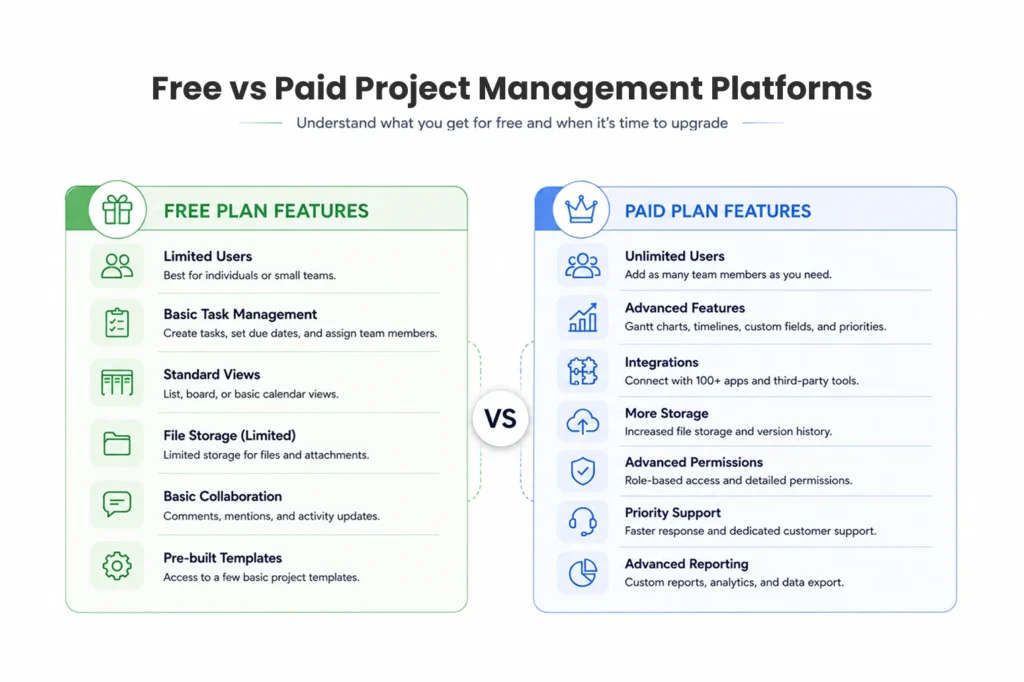
Paid plans usually add advanced performance analytics, customized automation workflows that save hours of manual clicking, enterprise-level security permissions, expanded third-party integrations, and highly custom dashboards. The right decision ultimately depends on project complexity and security requirements rather than company size alone. A small team handling highly sensitive medical data may require a paid tier immediately, while a larger content team might thrive on a free tier for years.
Common Mistakes When Choosing Project Management Tools
Many enthusiastic teams select software based entirely on general popularity or aggressive marketing instead of evaluating direct workflow compatibility. This often leads to wasted time, frustrated employees, and abandoned software implementations.
Ignoring Team Adoption
A complex, highly technical interface often leads to incredibly poor adoption rates among non-technical staff. If the marketing or human resources team cannot easily figure out how to update their tasks, they will simply stop using the system entirely. Simpler tools that require zero training may perform drastically better in practice than highly complex systems with features your team will never touch.
Focusing Only on Features
More features do not consistently translate to improved productivity. Teams should heavily prioritize fundamental usability and operational clarity over sheer feature quantity. A platform with thousands of toggles and hidden menus can paralyze an employee trying to complete a simple update. Always choose the tool that makes completing the actual work easier.
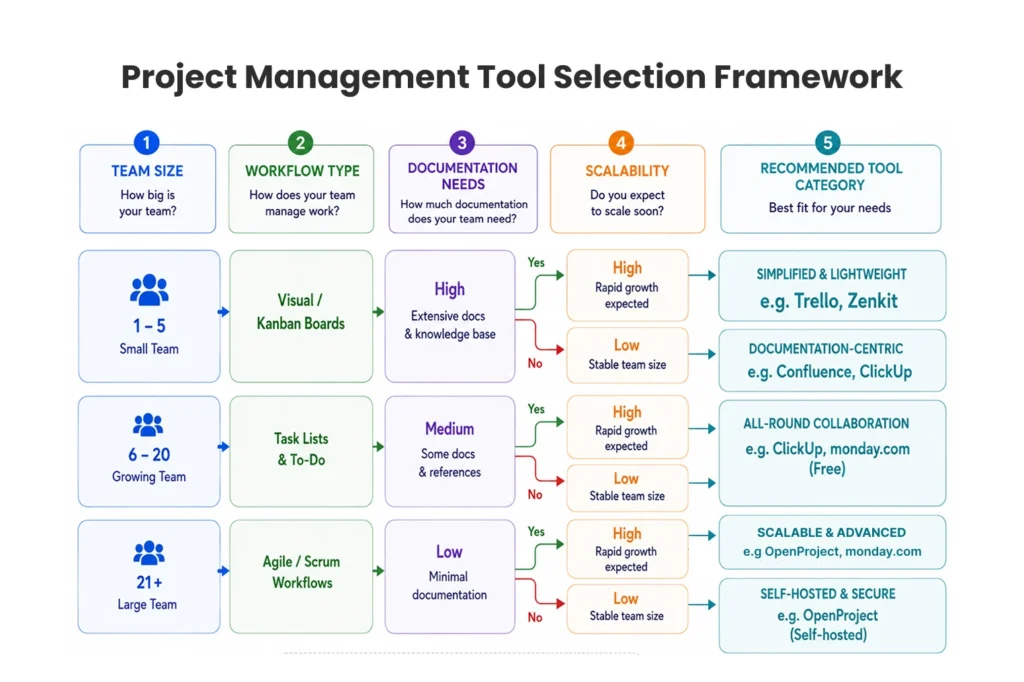
Choosing the Right Tool for Your Team
Selecting the ideal free project management software depends completely on your team’s specific structure, your daily operational complexity, and your ambitious long-term scalability goals. Some businesses desperately need simple, visual task boards to keep creatives aligned, while others require intense documentation management, rigid Agile workflows, or completely self-hosted environments to satisfy data compliance laws.

The best strategic approach is to thoroughly evaluate basic usability, core collaboration features, and growth flexibility before officially committing your entire team to a platform. Testing a tool with a small pilot group often reveals hidden friction points before a company-wide rollout. A tool that actively supports organizational clarity, personal accountability, and seamless communication will consistently deliver significantly better operational outcomes over time. Find the platform that removes obstacles, centralize your workflows, and watch your team’s productivity accelerate.
FAQ
1. What is free project management software?
Free project management software helps teams organize tasks, track deadlines, manage collaboration, and monitor project progress without paying for a subscription plan. These tools usually include features like Kanban boards, calendars, task assignments, and file sharing.
2. Which free project management software is best for startups?
Startups often prefer platforms like ClickUp because of flexible free plans, unlimited users, and collaboration features that support fast-growing teams.
3. Can small businesses use free project management software effectively?
Yes. Small businesses can manage workflows, assign responsibilities, and improve communication using free project management software before moving to premium plans as operations grow.
4. Is open-source project management software a good option?
Open-source platforms like OpenProject work well for businesses that need customization, self-hosting, and stronger control over project data.
5. What is the difference between free and paid project management platforms?
Free plans usually offer basic collaboration and task management features, while paid plans include advanced analytics, integrations, automation workflows, and enterprise-level permissions.